



Appendix A: Post.Office Architecture
This appendix contains a comprehensive discussion of the conceptual architecture employed in the design of the Post.Office software. Most people don’t need or have much interest in this information. It’s dry and unbearably detailed, even according to the unbelievably stultifying standards of the manual-aficionado community.
Unless you are the type of person who looks under the hood before renting a car, asks for a list of ingredients when dining at a restaurant, or wishes you knew how your favorite word processing program was designed rather than just how to use it, you don’t need to read this. If you are among the few people who need to assess the software architecture to alleviate security concerns or are just so plain curious you read the dictionary for fun, this one’s for you!
As mentioned briefly in Chapter 2, Post.Office functions are distributed among a number of software components which work together to carry out message handling and other activities. Briefly they are:
Figure A-1 (below) shows Post.Office broken down into its major functional pieces. These pieces run under the supervision of the Dispatcher (not shown).
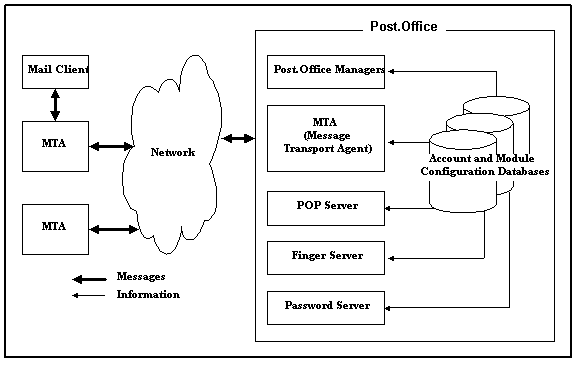
Figure A-1: A bird's eye view: the primary components of Post.Office running under the control of the Dispatcher.
We will refer back to this top-level architecture several times as we fill out the details of the lower-level components and reveal the deep, dark truths about Post.Office.
The Dispatcher’s job is simple; it monitors all network ports related to e-mail and launches the appropriate modules to handle incoming connections.
The Dispatcher also controls the number of simultaneous processes which can be operating, in order to limit the amount of computer resources used to process e-mail. For example, when the Dispatcher notices an incoming e-mail message on port 25, it starts up the MTA, which takes the message in and decides what to do with it. In terms of Figure A-1, the Dispatcher can be thought of as an all-encompassing envelope containing and initiating the processes of all items shown within the box labeled "Post.Office."
Every Post.Office module has a database containing the configuration information for that module. In addition, a separate database exists for the storage of account and mailing list information.
The database for each module is fairly small, containing a few configuration options which allow customization of the module’s operation, and a list of error messages.
The account database, however, holds all mail account and mailing list information, so it can be quite large. All modules refer to the account database whenever they need information in order to process a message or otherwise carry out a task, and since all user information is stored in one place, a single configuration change to the accounts database provides updated information to all modules at once.
Post.Office is first and foremost a message transport agent, or MTA. Since the MTA represents the primary functionality of the entire Post.Office system, we will take a look at its role in much greater detail.
An MTA can be used to coordinate message transfer between a small number of computers on a local network, or to orchestrate the transfer of thousands of messages beyond the local network to the millions of on-line users around the world hooked up to the Internet.
Distinct tasks are assigned to the various components of the MTA:
These basic components of the Post.Office MTA are depicted in Figure A-2 and will be discussed in greater detail in the sections that follow.
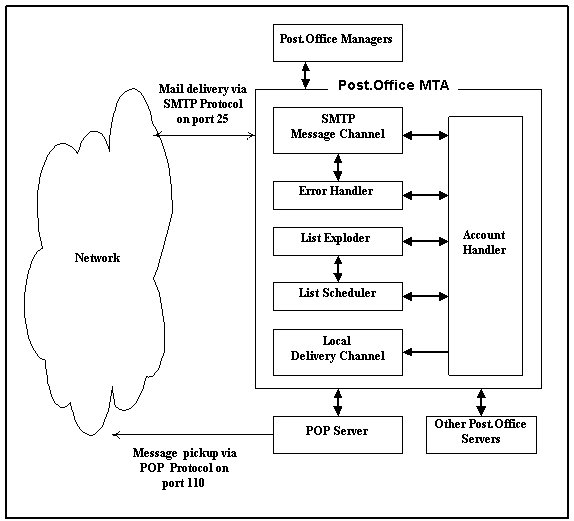
Figure A-2: The components of the Post.Office Message Transport Agent.
The Post.Office SMTP channel exchanges messages with other mail servers and accepts new messages from mail clients. It can relay messages to and from other modules of Post.Office and, in some cases, accept and dispatch messages without consulting other modules. One of its principal tasks is to accept messages addressed to local recipients (users with accounts on the server running Post.Office) and forward them to the local delivery channel.
The SMTP channel is a group of Post.Office modules which transfer messages using the Simple Mail Transfer Protocol. It consists of an agent that accepts mail (SMTP-Accept), one that routes mail (SMTP-Router), and one that delivers mail (SMTP-Deliver).

Figure A-3: The innards of the SMTP Message Channel.
SMTP-Accept is the module which accepts incoming messages on port 25 as detected by the Post.Office Dispatcher. SMTP-Accept can be configured to accept messages only for recipients that it recognizes, or you can allow the server to accept messages and forward them to other mail servers. Once a message comes in, it is immediately transferred to the SMTP routing agent.
SMTP-Router, the SMTP routing agent, examines message headers and, based on the instructions they contain, determines how the mail should be handled. If the message is to be relayed to another MTA, the router forwards it to SMTP-Deliver. If it should be delivered to a local user, the router hands off to the Account Handler. And if there is some confusion as to where the message should go, the router passes it to the Error Handler.
SMTP-Deliver sends messages to other remote MTAs which speak the same protocol (SMTP). This module takes a message from SMTP-Router, contacts the remote MTA responsible for mail addressed to the recipient of the message, and delivers the message to that MTA. Part of this module’s task is determining the remote MTA to which the message should be sent.
In some cases, a message is transferred solely by the SMTP channel. This is true for mail addressed to users with mail accounts somewhere out on the Internet or on another machine on your local network; those messages are accepted, routed, and delivered (to another MTA) through the SMTP channel only. However, if a message is addressed to a local user (someone with a mail account on your Post.Office server), the process is different. In such cases, the message is accepted by SMTP-Accept, passed through SMTP-Router to the Account Handler, and then forwarded to the local delivery channel for delivery to the user on this particular Post.Office host (see next section for more information on the local delivery channel).
When Post.Office accepts a message that it recognizes as being addressed to a local recipient (that is, someone with an e-mail account on this server), the message is routed to the local delivery channel. The local delivery channel carries out the final delivery of all local e-mail messages.
The local delivery channel consists of those Post.Office modules that transfer messages to mail clients via POP3 delivery, UNIX delivery, and/or program delivery. The path a message takes to reach a particular recipient is determined by the delivery method(s) recorded in the Account Data Form for that user (see Chapter 5 for details).
Messages destined for POP3 delivery are passed to the Mailbox Deliver module. That module takes the incoming mail and files it in the local user’s POP3 mailbox directory. The mail can then be retrieved by any POP3-compatible mail client running on a remote computer.
To access his POP3 mailbox and retrieve mail, a user need only have the required client software and a means of establishing temporary contact with the host machine (the computer on which Post.Office is running). Thus any computer that can connect to the host machine (generally via a network such as an Ethernet or the Internet but a modem will do the trick in a pinch) can be part of the e-mail system that Post.Office coordinates.
Program delivery allows users to have their messages delivered to a program. The selected program can perform any operation of the user’s choosing provided it meets with the approval of you, the Postmaster.
When a user’s mail account specifies program delivery, all messages addressed to that account are passed to the Program Deliver module. The Program Deliver module takes the incoming mail, locates and launches the target program, hands off the message, and waits patiently for notice that program processing is complete.
For the purpose of understanding system architecture, this discussion is sufficient. In truth, establishing program delivery is a bit more complicated. First, it requires that the user have a system account. Second, it requires that the target program be stored in a particular Post.Office directory. Finally, there may be issues with passwords and file permissions. For an exhaustive explanation of the program delivery feature, please refer to Chapter 6.
The three components of the local delivery channel are depicted in Figure A-4.
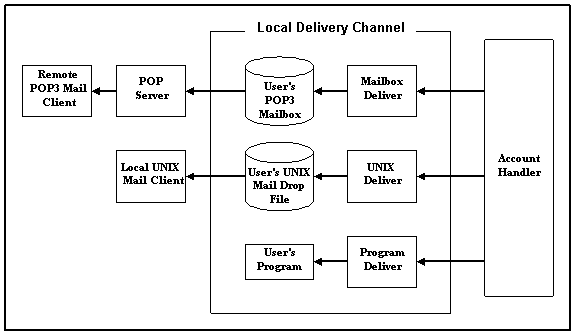
Figure A-4: The Local Delivery Channel -- POP3, UNIX and Program delivery.
Handlers are the brains in Post.Office. They decide what to do with messages and supervise the transport of e-mail between modules. The Account Handler bears primary responsibility for the routing of mail through your Post.Office mail server. It handles all standard transactions and forwards strange messages that it can’t understand to the Error Handler. The Error Handler is responsible for the resolution of problem messages. You, as Postmaster, communicate directly with the Error Handler when responding to Message Action Forms (see Chapter 8 for details).
The Auto-Reply Handler is responsible for providing an automatic e-mail response for those accounts which have the Auto-Reply feature selected. It formulates the outgoing messages and forwards them for delivery.
Figure A-2 hints at the central role the Account Handler plays in coordinating message transport. It routes messages between channels and between the various Post.Office modules, making its decisions based on information located in the accounts and configuration databases.
Like all computer programs, the Account Handler is limited by its startling insensitivity, complete lack of intuition, and implacable lack of creativity. Since humans sometimes make mistakes in addressing and sending e-mail, occasionally messages are consigned to the Error Handler, most often due to a faulty address.
Anytime Post.Office receives a message it does not understand, it gives it to the Error Handler. In some cases error messages are simply returned to the sender. In others, they are held until the Postmaster decides what to do with them.
If the offending message is returned, the Postmaster is advised via e-mail that an error occurred. Such notices are provided for information only, no further action is necessary.
Messages with error conditions that require Postmaster intervention are held pending resolution. An entry is posted to the Error Message Handler web form advising the Postmaster of the problem. In addition, the Error Handler can advise the Postmaster via e-mail.
The Error Handler provides the Postmaster with several options for resolving the error. The Postmaster must then decide which option to select. Submission of a correction resolves the error and removes the entry from the Error Message Handler web form.
The Auto-Reply Handler allows Post.Office to automatically reply to messages received by a local account. When an incoming message is processed by the Account Handler, a check is made to determine if an automatic response should be invoked. If so, the Auto-Reply module receives the intended content of the message (which is specific for each account), formats an outbound message in response to the one received, and passes this reply back to the Post.Office MTA for delivery.
There are three Auto-Reply operating modes. They are:
• Vacation. The first message sent to an account receives an automatic response. Subsequent messages from the same address are ignored.
• Reply. An automatic response is returned to every incoming message.
• Echo. For every incoming message, an automatic response is generated. The response contains the account-specific reply message and the text of the original incoming mail.
Messages submitted to a mailing list for posting are handled by the List Exploder and List Scheduler modules. The List Exploder assumes primary responsibility for all such mail and hands off to the List Scheduler as required.
The Account Handler directs mail addressed to a mailing list address to the List Exploder. The List Exploder obtains mailing list data from the accounts database, expands (explodes) list traffic to the subscribed user addresses, and rewrites the messages so that they contain the appropriate list information (prologue text, epilogue text, etc.) List messages slated for immediate delivery are sent back to the Account Handler. Messages to be held for a regularly scheduled digest delivery are forwarded to the List Scheduler.
Messages received by the List Scheduler are held pending digest delivery. At the scheduled time, all mail addressed to a particular list is combined into a single message and passed off to the Account Handler for delivery.
Mailing List statistics are generated by the List Scheduler and sent to the appropriate list owner once a day. Additional statistics can be written to the Post.Office log files if exact tracking of digest delivery is required.
Post.Office managers are responsible for the maintenance of the Post.Office accounts and configuration databases. The databases are maintained via entries made in web or e-mail forms. The form used and the type of data being manipulated determine which of the Post.Office managers will be called.
E-mail forms are issued and processed by three modules: the Configuration Manager, the Account Manager, and the List Manager. The Configuration Manager supervises configuration for all Post.Office modules via interaction with the configuration database. The Account Manager oversees the addition, deletion, and modification of mail account data stored in the account database. The List Manager also interacts with the account database, but it handles mailing list information exclusively.
Database management via web forms is the responsibility of the WWW-Server regardless of the database in which the information resides.
Every module includes a few configuration options which can be set by the Postmaster. A minimal set of essential options are established at time of installation, allowing Post.Office to do its job "straight out of the box." If additional configuration is required, the Postmaster is free to make changes as desired.
Typically, the Postmaster would make such changes via the convenient web form interface. But in the event that web access is unavailable, those same changes can be made via e-mail. When modifying configuration information via e-mail you are interacting with the Configuration Manager. The Configuration Manager provides the required e-mail entry forms, reviews the returned forms for proper permissions (your password), then executes the changes specified.
Like the Configuration Manager, the Account Manager handles e-mail forms only. Again, this is not the preferred method of database management, but it’s quick, it’s easy, and it’s available if you’re interested.
The List Manager also processes e-mail forms, but the requests it handles pertain to mailing lists only. Mailing list requests (such as the subscribe command) are passed to the List Manager for processing. Because mailing lists frequently involve large numbers of remote users, e-mail management of mailing list data is more common than e-mail management of account or configuration information. In fact, certain operations, like the request for a list of subscribers, can only be completed via e-mail.
The WWW Server is roughly equivalent to the Account Manager, Configuration Manager and List Manager combined. It maintains the same database information, but handles the transactions via a Web interface rather than an e-mail interface.
The POP server component of Post.Office is responsible for handling POP3 e-mail client requests to download messages. The POP3 protocol is the most common method of retrieving messages from a mail server, and allows users to download mail to their local system, where it can be read, replied to, deleted, ignored, etc. This server operates independently of the Post.Office MTA, except for the fact that they refer to a common accounts database.
The POP server receives inquiries directly from the network according to the POP3 protocol. When an e-mail client contacts the POP server, it provides a login name and a password for a particular user. The POP server then checks with the accounts database to confirm that an existing account corresponds to the given login name, and that the given password is correct for this account. If the login information is found to be valid, the POP server then answers subsequent client commands to list and download the messages waiting in the account’s Post.Office mailbox.
For maximum security, access to retrieving mail from the POP server can be limited to specific domains or hosts (or eliminated completely) at the discretion of the administrator.
Post.Office includes a finger server. Finger is the most common directory service on the Internet, and provides a means of obtaining basic information about someone by using their e-mail address.
The finger server receives inquiries directly from the network according to the finger protocol. Referring to the appropriate information in the account database, it responds directly to the query over the network. This server operates independently of the Post.Office Message Transport Agent, except for the fact that they refer to a common database (the account database). This, coupled with the fact that the finger service can be automated, facilitates easy management and consistency of information, and greatly reduces the workload of the administrator. Additionally, it provides the added security benefit of employing one coordinated set of services (to which access can be limited as desired) rather than a haphazard array of individual servers.
For maximum security, access to the finger service can be limited to specific domains or hosts (or eliminated completely) at the discretion of the administrator. The individual information provided on the finger server can be modified by the users, but this activity is made secure through the use of passwords and finger access domain restrictions.
The Password Server allows user’s to access the mail server and change their Post.Office password via the Eudora mail client. This feature, however, affects the Post.Office password only and will have no apparent effect on access privileges if you have selected to use NT Logon passwords instead of the standard Post.Office passwords.
By now you should have a pretty good understanding of the various Post.Office software modules and how they interact to handle mail, configure the system, respond to finger queries, etc. It is also important to remember that only certain Post.Office modules communicate with the outside world. Those network modules are listed below with the number of the port over which they communicate.
The remaining modules are local; they operate entirely within the Post.Office mail server and are invisible to the outside world.
The distinction between network and local processes is significant when evaluating load on your mail server. Although the number of concurrent processes allowed is under Postmaster control, we recommend that you maintain low limits to ensure smooth running of your mail server. For additional information on recommended levels, review the section on concurrent network and/or local processes found in Chapter 4.
Figure A-5 puts it all together - the complete workings of the Post.Office mail server.
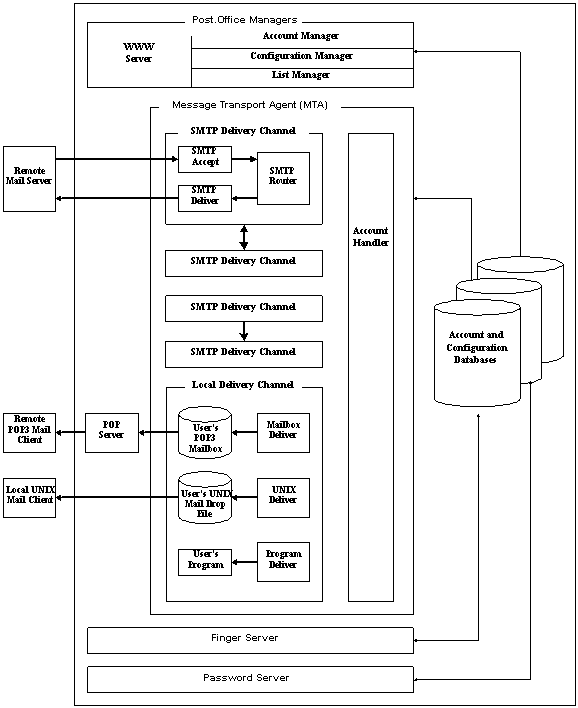
Figure A-5: The whole Post.Office enchilada.
Thank you for your interest in Post.Office.
Post.Office ©Software.com, Inc. 1994-1998
