



Troubleshooting
The best time to review recommended troubleshooting techniques is before you have a problem. With that in mind we’ve developed the following sections to provide you with the background information necessary to handle exceptional situations with confidence. We’ve even included an overview of our favorite troubleshooting tools.
For a more extensive list of questions and answers
check the Post.Office FAQ. The FAQ is an open document with answers to frequently
asked questions about Post.Office. It’s available on our web site at http://www.tenon.com.
We continuously update and revise the FAQ to reflect new questions from our
customers and discuss new features available in Post.Office.
You can obtain the FAQ via the web.
We encourage you to review the FAQ every once in a while. That way you’ll be able to find answers to your questions before they come up, and gain insight as to how other folks put Post.Office to good use.
The first step in troubleshooting your mail server is understanding what’s happening behind the scenes.
Post.Office is always listening for incoming mail on the standard port for SMTP transactions (port 25). This incoming mail can be from:
Once mail is received by Post.Office it must determine to whom it should be delivered. To make that decision Post.Office relies on the addressing information that appears on the electronic envelope "containing" the message. The addresses on the envelope are referred to by different names than those on the message header and may, in fact, contain different information. The "Mail From:" and "Rcpt To:" addresses on the envelope are analogous to the "To:" and "From:" addresses on the message header, but it’s important to note that Post.Office relies on the information provided in the former and not the latter.
The steps below provide a summary of the delivery process. Each step is explained in detail in the sections that follow. The concepts are illustrated in Figures 10-1 and 10-2.
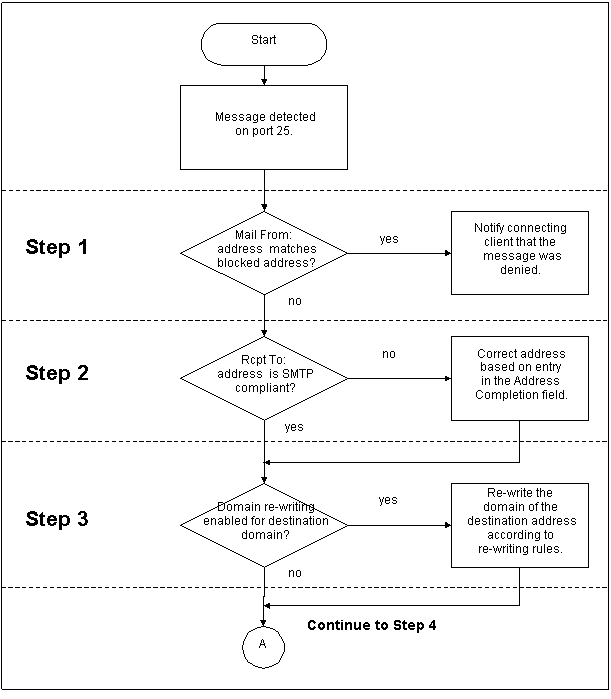
Figure 10-1:
Initial operations performed on all mail received by the Post.Office
server
If you are using the Mail Blocking features,
Post.Office will check the sender address of each incoming message against the
list of addresses, domains, and usernames specified on the Mail Blocking Form.
If the "Mail From:" address is covered under any of these blocking
rules, the sending client is notified that the message will not be accepted.
Note that Post.Office does this immediately after it receives the sender address
in the "Mail From:" SMTP command; it will not even read in the headers
and body of rejected messages.
In order to deliver mail, Post.Office requires standard, fully qualified SMTP addresses in both the "Mail From:" and "Rcpt To:" fields on the message envelope. If the original delivery address conforms to SMTP standards (i.e., it is in the format xxx@yyy.zzz or some other variation that includes an @ sign and at least one dot to the right of the symbol) the server proceeds immediately to Step 3. However, if Post.Office receives a message envelope from a mail client or server that does not have a standard SMTP address (i.e. joe), it will attempt to make the address compliant. The logic for address completion is as follows:
Post.Office next checks the domain portion of each "Rcpt To:" address to determine if it should be rewritten. If an entry exists for a domain in the Incoming Domain Rewriting table, then all destination addresses that include the domain will be automatically rewritten to the new domain value before moving on to Step 4.
For example, if you have defined an Incoming Domain Rewriting rule to rewrite the domain accordance.com to software.com, then all messages sent to
john.doe@accordance.com
will have their envelope destination address rewritten in this step to
john.doe@software.com
If domain rewriting is not required, Post.Office simply continues on to Step 4 without making any changes to the message.
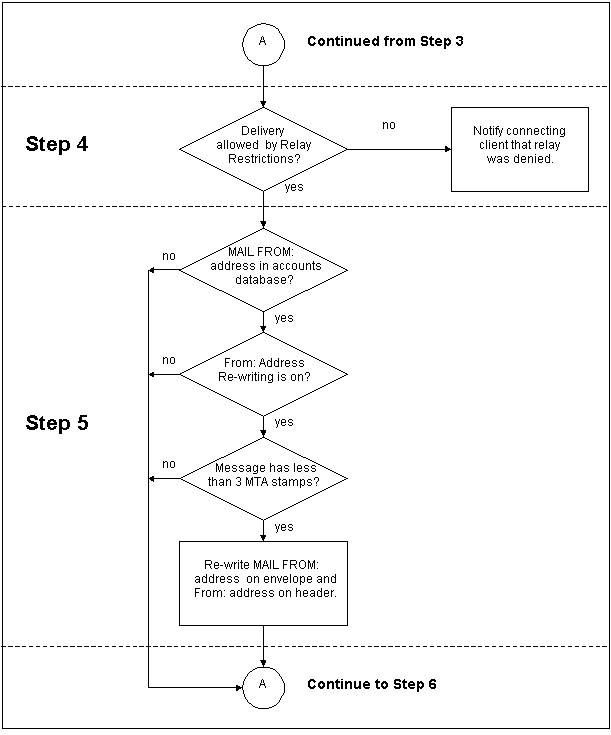
Figure 10-2:
The various steps in determining whether a return address will be re-written.
Next, Post.Office checks its SMTP Relay Restrictions to see if relay is being restricted. If no relay restrictions exist, the message continues on to Step 5.
If relay is restricted, Post.Office checks the IP address of the connecting client, as well as the "Mail From:" address, against the values specified in the SMTP Relay Restrictions Form. If these rules do not restrict mail from this sender, then the message proceeds to Step 5; otherwise, it is considered restricted.
If the message is found to be restricted, Post.Office then checks the Relay Restrictions delivery rules, which define the domains which are allowed to receive restricted relay mail. If delivery to a recipient is allowed by these rules (for instance, if it is addressed to a local user), then the message continues on to Step 5. If delivery is not allowed, Post.Office notifies the connecting client that the relay attempt was rejected.
Post.Office will check to determine if the message header’s From: address should be re-written. It will only re-write the address if Post.Office is the first or second mail server to have received the message. Otherwise, we consider ourselves too "far" from the user to perform From Address Rewriting. (Post.Office determines how far a message has traveled by counting the "received by" lines in the envelope header.)
To determine if the "Rcpt To:" address should be re-written, Post.Office looks for an exact match between the "From" address on the envelope and any of the Internet addresses listed in the accounts database. If no match is found (or the message is from too far away), the system proceeds to Step 6. If an exact match is found between the "Rcpt To:" address on the envelope and an entry in the Internet Addresses field of any locally defined account, the From Address Rewrite Style for that account is noted. If the entry in the From Address Rewrite Style field is none, the address is left as originally written. If a From Address Rewrite style is indicated, the server retrieves the Primary Internet Address for the account, formats the address in the style indicated, and uses the re-formatted address to replace the original "Rcpt To:" address on the envelope, and the "From:" address on the message header.

Figure 10-3:
The operations performed by Post.Office when attempting to deliver a
message (continued from Figure 10-1)
Next Post.Office checks the "Rcpt To:"
address on the envelope against the entries in the
SMTP Channel Alias Table to determine if the message should be immediately re-routed
to another account address on another mail server host.
If the "Rcpt To:" address on the envelope matches an Internet address listed in the left section of an alias entry, Post.Office replaces that address with the address in the right section and skips ahead to Step 10.
If no match is found, Post.Office patiently proceeds to Step 7.
If the "Rcpt To:" address on the envelope is not found in the SMTP Channel Alias Table, Post.Office will try to determine if the mail should be delivered locally. Local delivery is determined by matching the "Rcpt To:" address on the envelope with an Internet address in the Post.Office accounts database. If an exact match is found among the entries in the Internet Addresses field of any account, Post.Office will deliver the message to that account as specified (i.e. POP3 Delivery, Forwarding, Local Deliver, and/or Program Delivery for UNIX Systems). If a match is found among the Internet addresses for a local mailing list, the message will be sent on to the appropriate list management module for handling. (See the next section of this chapter for a more complete discussion of list mail handling.)
If the address on the envelope does not match the address for any local mail account or local mailing list, the system proceeds to Step 8.
If the "Rcpt To:" address on the envelope
is not found in a Post.Office account definition, Post.Office will check to
see if it has the authority to say that it is an "unknown user or account
for this domain." It does this by comparing the domain in the "Rcpt
To:" address to the list of local mail domains maintained in the configuration
database (entries made via the Local Mail Domain field in the Post.Office System
Configuration Form). If a match is found, it indicates that Post.Office is the
sole mail server for this domain and any addresses not found locally are considered
unknown. An error message will be generated saying that the message recipient
is an unknown account. This message will be sent by Post.Office to the Postmaster
(always) and to the originator (if defined to do so in the Error Response Parameters
web form).
If the domain in the "Rcpt To:" address on the envelope is not found among the entries in the Local Mail Domain field (there may be more than one), Post.Office will assume another mail server is responsible for this domain.
To determine if mail for that domain should be
routed to another specific mail server host, Post.Office checks the entries
in its Mail Routing Table (MRT). If the domain in the envelope delivery address
matches the domain listed to the left of the colon in any MRT entry, Post.Office
re-directs the message to the machine identified on the right side of the colon.
For example, to route mail addressed to the domain msmail.com to the SMTP gateway for that domain, the required entry would be:
msmail.com:[tcp/ip_address_of_msmail_gateway]
And to ensure that mail to all hosts and subdomains was similarly routed, this additional entry should be made:
*.msmail.com:[tcp/ip_address_of_msmail_gateway]
To route all mail to a firewall mail server, entries like the ones below are required:
*:[tcp/ip_address_of_firewall]

*.*:[tcp/ip_address_of_firewall]
If the entry to the right of the colon specifies a TCP/IP address, Post.Office will deliver the mail to that host without assistance. If the route is defined as a host or domain name, Post.Office will need to proceed to Step 10 locate the IP address for that external host.
Similarly, if no match is found, Post.Office
proceeds to Step 10.
If the domain name in the message envelope’s "Rcpt To:" address is not listed in the Mail Routing Table, Post.Office assumes it should deliver the mail message externally to the mail server defined for that domain in the Domain Name System (DNS).
Post.Office will ask its host machine to find the TCP/IP address of the mail server for the specified domain. The host will first ask for the Mail Exchange Record (MX record) defined for that domain and, if found, will return the TCP/IP address of that mail server. If no MX record is found, the host will ask for the Address Record (A record) for that domain and, if found, will return the TCP/IP address of that host. If no MX or A record are found for the domain, the host will check its local host file to see the domain name is listed there. Assuming one of these requests comes back with a TCP/IP address, Post.Office will deliver the message to that address.
If no TCP/IP address can be found for that domain, the message will be considered undeliverable. An error message will be generated within Post.Office and sent to the originator of the message, unless the return address is bad, in which case the Postmaster will be notified.
Two new mail server options introduced in Post.Office 3.5 can affect the routing of mail within your system. The use of either requires an understanding of the concept of local mail domains.
Local mail domains are identified via entries on the Mail Routing Options web form. They are mail domains over which you are claiming complete authority. As a result, you are allowed to decide the fate of all messages sent to any address within that domain.
Automatic refusal of mail for unknown local
users, causes a change in Step 8. If the option to "Verify recipients
within Local Mail Domains before accepting mail?" is
turned on, the server checks for the existence of a local mail account before
accepting delivery of a message. If no local account is found, delivery is refused.
This pre-qualifying step saves time by eliminating the need for processing bounced
mail through your server. It also provides the sender with an immediate opportunity
to correct the unrecognized address.
Wildcard@Domain addressing causes further complications by allowing the Postmaster to specify an account for receipt of messages sent to an unknown address within a local mail domain.
When a wildcard address is included in a mail account, that account will receive all mail addressed to the designated domain unless an exact match for the message’s Rcpt To: address is found among the addresses specified for a local mail account. This process effectively short circuits the mail routing hierarchy.
The system proceeds through steps 1-3 and then seeks a match for the delivery address among the standard Internet addresses in the accounts database. If a match is found, the message will be delivered to the appropriate local account. If a match is not found, the system will look for an address in the form *@domain. If a match is found, the message will be delivered to the account containing the wildcard address.
Great care should be taken in using this feature as it offers the potential for an abuse of privacy. Mail intended for another recipient may end up in the wildcard account as a result of a spelling error. As a result, the person reviewing messages delivered to the wildcard account may have access to mail that was intended to be confidential. If your intention is to avoid the handling of mail addressed to Unknown Users, a better choice would be to avoid using wildcard addressing and instead set the error response option for Unknown Local Users (found on the Error Response Parameters web form) to Return to Sender. This results in the automatic return of all mail sent to an unknown address within your local mail domain.
Mailing list correspondence is sent to one of the following three addresses.
The handling of such mail varies based on the address to which it was addressed. When Post.Office searches the accounts database and finds a match for the "Rcpt To:" address of a message among the information for a mailing list, it notes the type of address for which the match was found and processes the message appropriately. Detailed descriptions of the processing for each address type appear in the sections that follow.
Messages are sent to a list address with the intention of having them forwarded to all subscribers. If the list is defined without restriction, this is exactly what will happen. However, before posting can occur the following checks are made:
Is the message a request that was sent to the wrong address (i.e., does it appear to contain a mailing list request that should have been sent to the list request address)?
If a request keyword (like subscribe) is sent to a list address and the Detect Requests option is turned on, the message will be returned to sender with an error message stating that: "A request was posted to the list." No further processing will occur.
Is the user a subscriber?
Post.Office checks the sender’s address against each subscriber address for the list. If a match is found, the sender is considered a subscriber, and the submission is handled according to the list’s posting policy for subscribers.
If the posting policy is "Open," the message is immediately posted to the list. If the posting policy is "Moderated," the message is held pending list owner approval. If the policy is "Closed With Notification," the message is returned to the sender with an error stating the list is closed, and a message is sent to the list owner advising them of the rejection. If the policy is "Closed Without Notification," the sender still receives an error message, but the list owner is not notified.
If the sender of the message is not a subscriber to the list, Post.Office proceeds to the next question.
What is the posting policy for remote users?
Next, Post.Office checks the list’s posting policy for remote users. As in the previous example, if the posting policy is "Open," the message is immediately posted. If the posting policy is "Moderated," the message is held for approval. If the policy is "Closed With Notification," it is returned to the sender with an error message, and the list owner is notified. If the policy is "Closed Without Notification," the sender still receives an error message, but the list owner is not notified.
What happens to messages requiring list owner approval?
As noted above, if the list’s posting policy is "Moderated," list owner approval is required before posting can occur. If the owner approves the message, it is immediately posted to the list. If the list owner rejects the message, it is discarded (without notice to the sender).
As the name suggests, messages sent to a list request address are requesting something – information, access, etc. To handle request messages, the system asks and answers the following questions:
Is this a valid request?
Requests must be formatted is a specific manner in order to be recognized and accepted by Post.Office. If the formatting is incorrect, the message will be returned to the sender with an error noting the reason for rejection. On the other hand, if the formatting is valid Post.Office proceeds to the next step in the process. See Chapter 7 for example of the proper request message format.
Is this a request for list information?
Post.Office recognizes the keyword info as a request for mailing list information. Access to mailing list information is unrestricted, so the system responds immediately with the content of the mailing list’s long description.
Is this a request for subscriber information?
Is this a request for subscription to the list?
The keyword subscribe is recognized as a request for subscription. Subscription may or may not be subject to verification. If the verification option is turned on, a request for verification is returned to the subscribing address. If no response is received, the original request is ignored. If verification is confirmed (by return mail), the system continues processing the subscription request.
Once past the verification hurdle, the next step is to ascertain the identity of the individual requesting subscription – are they or are they not a local user (someone with a mail account on the server). Post.Office compares the address from which the request was received to the addresses in its accounts database. If a match is found, the request is from a local user. If not, it’s from a remote user.
Post.Office then checks the subscription policy for the appropriate user type. If the subscription policy is "Open," the user is subscribed to the list and notified by e-mail. If the subscription policy is "Moderated," the request is held pending list owner approval. If the policy is "Closed With Notification," the request is denied and the sender is advised via e-mail. If the policy is "Closed Without Notification," the sender still receives a rejection message, but the list owner is not notified.
Is this a request for unsubscription from the list?
The keyword unsubscribe indicates a desire to cancel list subscription. Unsubscription may or may not be subject to verification. If the verification option is turned on, a request for verification is returned to the requesting address. If no response is received, the original request is ignored. If verification is confirmed (by return mail), the system continues processing the unsubscription request.
Unsubscription may also be moderated. If the moderation option is turned on, the request is held subject to list owner approval.
What happens to messages requiring list owner approval?
Requests requiring moderation are reviewed by the list owner. If the owner approves the request, it is granted immediately. If the list owner rejects the request, it is denied.
People who wish to correspond with the owner of a list send mail to the list owner alias address. This address protects the privacy of the list owner by providing them with a means of anonymity. It also allows easy, behind-the-scenes transfers of list ownership.
Messages to the list owner alias address are immediately forwarded to the mail account of the responsible party, then handled according to the delivery method specified there.
All mailing list correspondence is subject to the global limits for a list. If any of these limits are exceeded, the message will be rejected, and returned to the sender with notification of the offending condition.
Not all lists have established limits, but possible limits involve:
Routine error handling (misaddressed messages, list mail that bounced, etc.) is covered in the discussion of system monitoring found in Chapter 8. However, before you turn there, you may want to review the error message you received carefully. It should be self-explanatory. Certain messages are only notices, and require no further action on your part, though it is generally good practice to keep track of errors since they are occasionally symptoms of a deeper malaise of your mail system.
More cryptic error codes are defined in the Post.Office FAQ which is available via the World Wide Web at http://www.software.com.
Each message accepted by the Post.Office mail server is immediately divided into three files: Header, Body, and Control. The Header and Body files (which contain the message’s header information and body text) are stored together in a temporary location, while the Control file circulates through the system’s modules for processing. Once the appropriate delivery action has been determined, the Header and Body are reunited in a single message file that is deposited in the user’s mailbox, forwarded to a program, or sent to another mail server for external delivery.
Usually this operation happens so quickly that the temporary storage phase is transparent. Occasionally, however, mail is held for interaction with a list owner or Postmaster. In such cases, it can be useful to know where the mail is stored in the interim.
In all cases, Header and Body files are stored
together until internal processing is complete. They are held in the messages
directory which is located within the Post.Office Spooling directory (Spooling
directory/messages).
Control files are stored in various directories depending on the reason mail is being held. The list below identifies the reasons mail may be held and indicates the location of the Control file in each case.
Spooling directory/deferred/SMTP-Deliver/unavailablehostname
Spooling directory/deferred/Error-Handler
Spooling directory/deferred/Program-Deliver
Spooling directory/deferred/List-Exploder/approval/LUID
Spooling directory/deferred/List-Scheduler/LUID
As a rule, any Control file which remains in
the deferred directory for more than a week should be subject to review. Do
not, however, delete Control files capriciously. All three message files (Control,
Header, and Body) must be handled as a group. Deleting one or two files from
a set can interfere with proper handling of that message.
This section provides an overview of the software commonly used by the Technical Support staff of Software.com in the course of researching possible problems with Post.Office. The functionality of this software is not covered in its entirety but simply to the extent that it is most useful when helping our customers successfully install, operate, and troubleshoot Post.Office.
Telnet is a tool which allows the user access, usually with proper permissions, to a remote computer. This can be quite useful when diagnosing problems. SMTP servers and POP servers may be accessed across the Internet (without knowing a password) because of the way the SMTP and POP3 ports operate. These ports (25 and 110 respectively) are always listening for queries from remote computers. Telnet can be used to communicate with Post.Office through these ports and actually ask it some simple questions. IMAP is also now supported and runs on port 143. Telnet is frequently used to learn the following:
What follows is a simple telnet session which will illustrate these operations.
To begin, from the command line, type "telnet" followed by a space and then the host.domain of the computer you wish to connect to followed by a space and then the port number and hit return.
Here’s a sample Telnet session:
# telnet mail.tenon.com 25

Trying 192.83.246.24...

Connected to mail.tenon.com.

Escape character is '^]'.

220 mail.tenon.com ESMTP server (Post.Office v3.5.3 release 223 ID# 1001-1000U100L20S0V35) ready Mon, 2 Sep 2002 16:01:15 -0700
This information tells you that a Post.Office MTA is alive and listening at port 25. You can also telnet to other ports to determine their status.
Now that you know that Post.Office is working, you could then determine if a specific Internet address exists for an account. In the following example we will look for an address jake@software.com.
If the account exists you will see something like the following:
250 jefe@tenon.com (jefe)
If the account does not exist, Post.Office will report the following:
550 Unknown address: <jefe@tenon.com>
Information such as that gathered with these simple Telnet operations can help determine if help is needed in starting the Post.Office server, or if the problem is simply an issue of mail accounts that were set up incorrectly.
Nslookup is a utility that allows you to request information from DNS nameservers. This software tool usually comes packaged with Name Servers or with other DNS software. With nslookup you can discover whether mail is capable of being delivered to any host or virtual domain on the Internet. With this information you will be prepared to advise you on how to configure your DNS records in order to successfully use Post.Office.
Nslookup can be started by bringing up a terminal window and typing "nslookup" at the prompt. From this point, there are a number of ways that nslookup can be used. Some of these different "functions" are summarized here. Each of these functions, with the exception of "server" can be initiated by typing "set q=*" or "set type=*" at the nslookup prompt.
This function tells nslookup that you want information about name servers that support a specific domain. For example, if you wanted to know which name servers support the top level domain "com" you would type the following at the nslookup prompt (note that there is a "." after the "com". This must be added in order to prevent nslookup from adding your domain to the end of "com" which would result in a search for "com.software.com", which would be no fun…)
(The nslookup prompt appears as a ">" in this example.)
>set q=ns

>com.

>com     nameserver = H.ROOT-SERVERS.NET

 com     nameserver = B.ROOT-SERVERS.NET

 com     nameserver = C.ROOT-SERVERS.NET

 com     nameserver = D.ROOT-SERVERS.NET

 com     nameserver = E.ROOT-SERVERS.NET

 com     nameserver = I.ROOT-SERVERS.NET

 com     nameserver = F.ROOT-SERVERS.NET

 com     nameserver = G.ROOT-SERVERS.NET

 com     nameserver = A.ROOT-SERVERS.NET

 H.ROOT-SERVERS.NET      internet address = 128.63.2.53

 B.ROOT-SERVERS.NET      internet address = 128.9.0.107

 C.ROOT-SERVERS.NET      internet address = 192.33.4.12

 D.ROOT-SERVERS.NET      internet address = 128.8.10.90

 E.ROOT-SERVERS.NET      internet address = 192.203.230.10

 I.ROOT-SERVERS.NET       internet address = 192.36.148.17

 F.ROOT-SERVERS.NET      internet address = 192.5.5.241

 G.ROOT-SERVERS.NET      internet address = 192.112.36.4

 A.ROOT-SERVERS.NET      internet address = 198.41.0.4
The list that nslookup provides is that of all of the name servers responsible for the domain "com" followed by their associated "A" records which match the name to its IP address.
In order for mail to be delivered on the Internet, a mechanism must exist to convert the host.domain of a mail server machine (sparky.software.com) to its appropriate IP number. This can be done in two places, either with the "hosts" file on the machine sending mail or with a referenced DNS name server. A query for MX records can be very helpful in determining if mail can be delivered to a mail server. Here’s how such an operation might look:
>set q=mx

>software.com

>software.com    preference = 20, mail exchanger = rex.software.com

 software.com    preference = 30, mail exchanger = smtp1.cerf.net

 software.com    nameserver = rex.software.com

 software.com    nameserver = allman.cabrillo.com

 software.com    nameserver = noc.cerf.net

 software.com    nameserver = rover.software.com

 rex.software.com       internet address = 198.17.234.33

 smtp1.cerf.net  internet address = 192.102.249.30

 allman.cabrillo.com     internet address = 206.29.8.1

 noc.cerf.net    internet address = 192.153.156.22

 rover.software.com   internet address = 198.17.234.110

>
The information this query returns tells us a number of things such as mail sent to user@software.com will first be delivered to a machine called rex.software.com which has an IP address of "198.17.234.33". If this attempt fails (maybe "rex" is not currently available), then a second attempt at delivery will be made to the backup mail server called "smtp1.cerf.net" with an IP address of "192.102.249.30". You can tell which machine is the "backup" by the numbers (in this case "20" and "30") found next to the words "mail exchanger". The protocol dictates that the first delivery attempt should be made to the machine with the lowest "preference" number (in this case "20"). In addition to this mail delivery information, there is a list of the name servers which are "Authoritative" for the domain (authoritative means they are responsible for maintaining the DNS records for the queried domain). There is also a list of "A" records for these name servers.
You and I like names, probably because they have meaning for us. With this in mind, the present day Internet is set up such that computers can be referenced with names which are usually easy to remember and work with (such as the computer rex.software.com). Computers, however, would regard this (if they could regard) as not too efficient and a sure sign of just how feeble minded their creators are. For this reason, there is another side of the Internet which allows for a number, called an "IP" (Internet Protocol) address, to represent a computer’s name. Computers like this a whole lot, and when a user sends mail to his/her friend, the computers in between quickly convert the host.domain into an IP address. This they use amongst themselves until it’s time to deliver the mail to the recipient human at which point they begrudgingly convert the IP number back into the user friendly host.domain. The DNS record which makes the correlation between the host.domain and its IP number is the "A" record (which stands for "address").
We can use NS lookup to ask for the "A" record of a certain host.domain or domain by setting "q=a". The following is an example of how this is done.
>set q=a

>rex.software.com

 Name:  rex.software.com

 Address:  198.17.234.33

>
This information, being so crucial to mail delivery, can help determine if a certain host.domain or domain is resolvable via DNS.
If, in the course of your Internet administration, you find it necessary to either learn more about a certain name server or perhaps you even wish to contact that name server’s administrator, you can use nslookup with "q=soa" to get the goods. Here’s an example.
(By the way, "sao" means "Source of Authority)
>set q=soa

>software.com

 software.com

 origin = rover.software.com

 mail addr = bindmaster.software.com

 serial = 9604090

 refresh = 43200 (12 hours)

 retry   = 7200 (2 hours)

 expire  = 1209600 (14 days)

 minimum ttl = 43200 (12 hours)

 software.com    nameserver = rover.software.com

 software.com    nameserver = rex.software.com

 software.com    nameserver = allman.cabrillo.com

 software.com    nameserver = noc.cerf.net

 rover.software.com   internet address = 198.17.234.110

 rex.software.com       internet address = 198.17.234.33

 allman.cabrillo.com     internet address = 206.29.8.1

 noc.cerf.net    internet address = 192.153.156.22

>
As you can see, this query really delivers. Among the items you may already recognize are some new bits of information that are quite useful.
Sometimes it is necessary to see if an IP number has a corresponding host.domain. When this needs to be done, the "q=ptr" is a handy function. Here’s an example. (PTR is short for "Pointer")
>set q=ptr

>198.17.234.110

110.234.17.198.in-addr.arpa     name = rover.software

234.17.198.IN-ADDR.ARPA nameserver = rover.software.com

234.17.198.IN-ADDR.ARPA nameserver = rex.software.com

234.17.198.IN-ADDR.ARPA nameserver = noc.cerf.net

234.17.198.IN-ADDR.ARPA nameserver = allman.cabrillo.com

rover.software.com   internet address = 198.17.234.11

rex.software.com       internet address = 198.17.234.33

noc.cerf.net    internet address = 192.153.156.22

allman.cabrillo.com     internet address = 206.29.8.1

>
Such a DNS query is called a "reverse lookup".
You may note that the first set of IP numbers in the results are backwards and
seem to end with "IN-ADDR.ARPA". This is another convention of the
DNS realm that is vital for proper name resolution.
DNS queries begin when a computer’s resolver asks the name server it has listed as its primary contact a question. It is possible to change this initial contact when using nslookup by specifying this with the "server" function. Here’s an example.
> server rover.software.com

 Default Server:  rover.software.com

 Address:  198.17.234.110

>
You may not find yourself doing this much, but it’s a good trick to have up your sleeve.
Ping is a utility which allows you to determine if a remote computer is up and running. This is useful if you wish to isolate a problem and you suspect that the remote computer may not be responding to network queries. Although the information received from a Ping query may not be very rich in content, it can be conclusive.
# ping 192.83.246.5

PING 192.83.246.5 (192.83.246.5): 56 octets data

64 octets from 192.83.246.5: icmp_seq=0 ttl=241 time=29.4 ms

64 octets from 192.83.246.5: icmp_seq=1 ttl=241 time=31.4 ms

64 octets from 192.83.246.5: icmp_seq=2 ttl=241 time=25.1 ms

64 octets from 192.83.246.5: icmp_seq=3 ttl=241 time=36.8 ms


--- 192.83.246.5 ping statistics ---

4 packets transmitted, 4 packets received, 0% packet loss

round-trip min/avg/max = 25.1/30.6/36.8 ms
As you can see from the example. The computer from which the ping query was issued delivered four separate packets each with 32 bytes of data. If these packets are received by the pinged host, it then issues a response which is what appears in the example.
Each "reply" displayed on the screen gives us a short profile of the packet which was sent and subsequently returned. This information includes the following:
Post.Office ©Software.com, Inc. 1994-1998
