



E-mail in a Nutshell
This chapter presents a non-technical overview of the basic concepts and common conventions of electronic mail (e-mail), including:
This chapter is not about the Post.Office mail system; rather, it is a brief introduction to some of the basic concepts that apply to most e-mail systems. It will be useful if you are new to the world of e-mail administration.
A more specific discussion of Post.Office follows in the next chapter, so if you already know what e-mail is and what kinds of programs comprise a mail system you may want to skip ahead.
E-mail is all about messages; that is, e-mail provides a way for two or more people to exchange messages. Just as the postal service is used to send postcards, letters, and magazines, e-mail is used to send various kinds of messages. An electronic message can range from a simple memo or letter to a complex multimedia presentation designed to overload and delight your senses. Regardless of its content, the message is the fundamental currency of electronic mail.
The most rudimentary method of leaving a message for someone who uses a computer is to tape a hand-written note on their monitor. The next step, electronic messaging in its most basic form, occurs when you type a few words in an open window on the computer screen hoping the next person who comes along will find it. This basic electronic message system works if nobody else needs to use that particular computer, and if you don’t mind leaving the computer and monitor on.
However, if more than two people are using this computer, then the electronic message must be stored (as a file on a disk) until the recipient comes along. Only when the message is safely put in a file can the computer be used for other purposes, employed by other users, or shut off. As long as the two users who wish to communicate agree upon a common file where they will store messages for each other, this system works.
However, using a large, single file is clumsy. Instead, users may agree upon a directory in which to store messages. Each message could then be stored as an individual file with a descriptive file name. Even so, a large volume of messages between several users can fill up a directory awfully fast, and it can become difficult to make heads or tails out of the resultant mess.
When confronted with a large number of message files, it would be nice to know several things about the message without opening the file, such as: who a message is for, what it’s about, and when it was sent. If more than two users share this system, it’s also useful to know who a message is from before reading it.
Historically, postal mail solved this problem of message organization with various conventions of encapsulation. Letters almost invariably began with an indication of who they were for. Often other information, such as where the letter was written and what the letter was about, preceded the main body of the message. It’s the same in e-mail. Messages are composed of headers and bodies. Headers include information such as sender, recipient, and subject, which allows recipients – and the programs that serve them – to sort and prioritize their mail before taking the time to examine the body of the message.
In addition to facilitating the handling of mail upon receipt, encapsulation allows mail to be delivered more efficiently. In postal mail, messages are placed in envelopes which contain only the information required for delivery (as well as a return address in the event mail cannot be delivered). Likewise, e-mail programs use electronic envelopes, which are marked with a destination and return address and "contain" the electronic message (header plus body). Basically, the principles behind e-mail are as simple as the postal mail that you’ve been using all along – relax, it’s not all that complicated.
When delivering a message from one user to another, however, an e-mail program only needs to know two things:
This information is used to create an envelope, which is directly analogous to a postal envelope: both are labeled with "to" and "from" addresses and contain the message (headers and body) within.
Only programs use envelopes – all that users ever get to see are the headers and body of a message. Still, it’s good to know that envelopes exist in case we ever need to really pin down an ontological definition of e-mail.
Delivery is only the first step in the process. There is still a need for easy organization or messages and the recognition of message content.
Corporations and other institutions have long used messages (often called memos) that have key pieces of information laid out in a series of headers at the beginning of the message (see Figure 1-1). Header information allows institutional mail services to deliver memos efficiently and gives memo recipients an initial idea of what the message is about before delving into the full content.
|
To: Jane D.
From: John S. Subject: Toga contract termination Date: July 27, 1994 --------------------------------------------------------- Jane, I have decided to terminate our contract with the Toga company. The togas don't seem to convey the corporate image which we require. Let's meet at 3:30 to discuss the details. OK? John |
Headers can be just as effective in managing a gaggle of electronic messages in a directory. One can make sense of a message file only by opening it and checking the header information to see who a message is for, what it’s about, who sent it, and when. This is tedious work. Fortunately, the dull, tedious, and repetitive work of opening a large number of message files and examining their headers is exactly the kind of thing that computers are good at.
As long as headers are consistently formatted, an e-mail program can easily scan through a pile of messages and find all the messages that begin with, for example, the line "To: Jane." Similarly, if other header information indicates when messages were written, a computer can organize these messages and present them to Jane in chronological order.
The key to headers, as far as computers are concerned, is that they be absolutely consistent. E-mail interoperability depends on an agreement (or standard protocol, as the people working on such things like to call agreements) for the formatting of the headers. While different e-mail systems do things differently, all have some kind of header information, and for two systems to be interoperable, any differences must be eliminated or somehow resolved.
It is the tight regulation of the use and format of headers which allows users with disparate e-mail programs to send each other electronic mail. At the same time, headers provide users with valuable information about their e-mail.
Just as the body of a letter tends to make up the bulk of traditional postal mail, in general the body makes up the bulk of an e-mail message. While users must cater to the needs of computers and programs when writing headers, there are no such restrictions on the body of a message. As a result, the body of an e-mail message tends to look a lot like the body of a postal letter.
Although often limited to the rather rudimentary ASCII character set, newer and more sophisticated electronic mail programs are increasingly allowing users to send each other elaborately formatted text and even graphics, sound, and video clips (multimedia). The more complex the message medium, the larger the amount of data that must be transferred when a message is sent from one user to another. In some systems, sending a large, complex file can create a bottleneck – a sort of traffic jam on the information superhighway. As increasing bandwidth allows larger data streams on networks, e-mail users will be able to make more and more use of data-intensive e-mail features.
Back in the days when people were still relieved about not having to use punch cards to talk to computers any more, sending any kind of text message was considered pretty cool. E-mail evolved without any allowances for video and audio files, or even rich text, the highly formatted text with bold, italics, and all the other spiffy stuff we’ve gotten used to since the word-processor consigned the typewriter to the antique shop.
In order to incorporate formatted text and multimedia into the Simple Mail Transfer Protocol (SMTP), which is currently the most common existing e-mail protocol, a new protocol called MIME (Multipurpose Internet Mail Extension) was developed. MIME allows you to incorporate anything from a recording of your newborn’s voice to a short movie in an e-mail message.
As long as both parties have MIME-enabled e-mail programs (not all e-mail programs support MIME), people can exchange any kind of multimedia file they want by simply appending the file to their message. Since multimedia is still in the early stages, you should check to make sure that someone has MIME capabilities before you send them a pile of stuff.
Mail clients are programs which assist users in carrying out tasks related to electronic mail. These include creating and submitting messages for delivery, checking for new incoming mail, reading received messages, and organizing the volumes of saved messages generated by high usage. The mail client is the only element in the maze of networks and e-mail handling programs with which most users have any contact (see Figure 1-2).
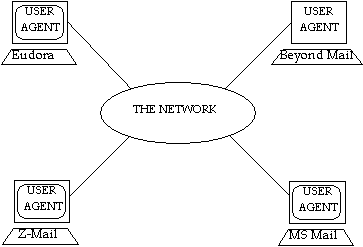
Figure 1-2 A mail client is the only e-mail program with which most users have any contact
(network not shown to scale).
If you ask users what e-mail program they use, they will generally tell you the name of their mail client. This is because the mail client takes care of most of the tasks required to send and receive messages. Other tasks are delegated to programs which are hidden from the user.
In its simplest form, a mail client is a program that allows you to create a text message for another person which can be read by that person with the help of a similar program. Mail clients which can send and receive graphics and multimedia work along the same lines as their simpler cousins. While all mail clients can handle plain text messages, the exchange of complex multimedia messages requires that the mail clients follow an agreed upon standard format, such as MIME, for the body of such messages.
To create a new e-mail message, mail clients frequently provide users with a message template, so that users need only fill in the blanks in order to complete the headers. Mail clients leave the body blank so that users can fill it in as they please. The mail client operates in this manner as a simple word processor, and most offer at least minimal editing functions. Together, these editing features allow users to include any amount of supplementary textual (and often multimedia) information in their messages. Once a message is complete, the mail client will forward the message to a more specialized e-mail program (a mail server) for delivery.
Mail clients typically list incoming messages on a menu or in a window which may be called the "In Box," or something similar. Often this message list shows who the message is from, when it was sent, and what the subject of the message is. Users select the message they wish to read, and it is displayed for them on the monitor (junk mail you throw away without reading, just like you already do with postal mail, but for once it doesn’t end up in a landfill).
Frequently users will want to save messages that they may need to look at again at a later date. Rather than maintain a single directory filled with a random assortment of messages, many mail clients help users organize their messages into a set of directories or mailboxes, so that messages can be organized by subject or according to whatever taxonomy the user prefers.
In today’s world of huge networks connecting bazillions of users, mail clients are not up to the task of transferring messages to their recipients. This task is relegated to specialized programs called mail servers (which are described in Section 1.3).
To send a message, a mail client needs only to give it to a mail server. This generally requires only a single command on the part of the user to whisk the message away across the networks. As long as networks are functioning correctly, a message can be delivered around the world in a matter of seconds.
A second and increasingly popular method of message delivery is directly supervised by the mail server. Rather than place incoming messages in an externally-controlled mailbox, the mail server itself manages the mailboxes, holding onto messages until the user checks for mail. When the user does this (remember, the user probably doesn’t even know that he has a mail server secretly working on his behalf), he uses the check mail command on his mail client, and the mail client checks with the mail server. If the mail server has any messages for that user, they are made available to the mail client, which in turn makes them available to the user. This second method employs the Post Office Protocol (POP).
The advantage of the POP delivery method is that it does not require that the mail server have access to the user’s mailbox directory (which means that the user need not have a system account on the server). This is advantageous in today’s networked environment where more and more often the mail client and the mail server are located on different computers. In this case, the mail server is at the disposal of the mail client, which contacts it when it wants to send out a message or check for mail (see Figure 1-3).
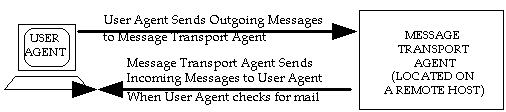
Figure 1-3 Often, when the mail client and the mail server are located on two different computers,
the mail server does not deliver messages until the mail client checks for mail.
Another advantage of POP delivery is that it does not require the user to have a system account on the same computer where the mail server is running.
A mail server is a specialized program designed to deliver messages across today’s increasingly large networks. Mail servers generally interact with other programs – primarily mail clients and other mail servers – rather than with users. The most common task which mail servers carry out is to accept a message from one mail client and deliver it to another.
Mail servers do most of the work in the e-mail universe, including the sorting, forwarding, storing, and delivering of mail. The function of a mail server is analogous to the postal service; late at night, in post offices around the globe, thousands of insomniacs sort through mountains of bills, catalogs, and coupon mailers, so that in the morning postal carriers can deliver these missives to our doors. If we think of a mail client as a personal secretary who helps us write our messages, we can liken mail server to the thousands of letter-sorters and others who work behind the scenes to ensure that we get our mail.
A mail server is also a database which stores information about your e-mail account – not the least of which is your e-mail address. All information regarding your account is stored in your mail server, including your password, instructions for how your mail should be delivered, and some other items that you probably never knew existed. Having an e-mail account really just means having a mail server account, so when your system administrator mentions "setting up an e-mail account," what they’re really talking about is adding a new user account to the mail server database.
Mail servers are daemon programs, which means that they are running 24 hours a day, ready and anxious to serve. When a mail client (or another mail server) wants to give a message to a mail server, it contacts it and gives it the message. In contrast, mail clients are usually only active when a user is interested in writing, sending, receiving, or perusing e-mail.
When messages need to travel between mail clients, it is commonly one or more mail servers that carry out the task. Figure 1-4 illustrates how mail servers such as Post.Office and sendmail transport messages between mail clients such as Eudora and Pine:
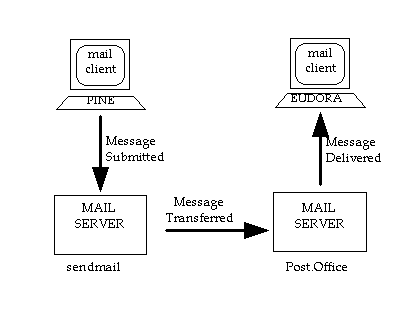
Figure 1-4 In a direct transmission, a message is forwarded between the two mail servers (in this example, Post.Office and sendmail) which are closest to the mail clients (in this example, Pine and Eudora). Message travel is indicated by the arrows.
We know that when mail is placed in a postal mail box, its next stop is a post office. There it is sorted and a forwarding decision is made. For local mail this may mean putting the letter in a mail delivery person’s mail pouch, while mail destined for a distant city may require that the process of sorting and forwarding be repeated several times at various post offices in different cities along the way.
This is the same method that is used in e-mail delivery. As an e-mail message travels from one mail client to another via one or more mail servers, decisions are made as to the routing of the message at each step along the way. Using the addressing information provided on the electronic "envelopes," mail servers sort through messages and make decisions about where to forward them. In some cases a message needs to be sorted only once and can then be forwarded directly to its recipient. In other cases this process must be repeated several times along the way.
If a message must travel from a writer at Software.com to his brother who is attending the University of Washington, the writer and his mail client create a message together. The mail client then gives the message to the mail server at Software.com. This mail server then forwards the message to another mail server at the University of Washington, and this second mail server then delivers the message to the writer’s brother. Broken down, this process consists of five steps, shown in Figure 1-5:
|
1. User to client (sender creates message)
2. Client to server (message forwarded) 3. Server to server (message forwarded) 4. Server to client (message forwarded) 5. Client to user (recipient reads message) |
Sometimes a message must be relayed by an intermediate mail server. In such a case it would be handled by three (or more) mail servers: one mail server that accepts the message from a mail client, another that relays it, and the last mail server which delivers it to the recipient’s mail client. In such a case, Step 3 of Figure 1-5 would be repeated one or more times:
All mail servers are daemons waiting for other e-mail programs to contact them and give them a message. Like all e-mail transactions, the conversation is a client/server transaction, a kind of call and response conversation in which one computer asks for something and another provides it. In this case the mail server that is accepting the message is a server, while the client that is transmitting the message could be a mail client or another mail server. The conversation can look something like the illustration shown in Figure 1-6.
|
Hello this is Computer1 (mail client or mail server)
>>> Hello this is Computer2 (mail server) I want to send you a message from Bob >>> OK It’s for Jane >>> OK Here’s the message, ending with our secret handshake >>> OK Data, data, ... data, secret handshake >>> Message received Good-bye. >>> Good-bye. |
When a mail server places a message in a user’s mailbox, it is simply creating and saving a file in the user’s directory. The alternative is for the mail server to hold onto a message in a mailbox of its own until a mail client retrieves any accumulated messages from another computer. The mail server will again act as a server while the mail client literally impersonates the recipient it is representing (Figure 1-7):
|
Hello? Anyone there?
>>> Hi, this is your mail server This is Jane >>> Jane, your mailbox has 2 new messages Give me the first one >>> Data, data, data... secret handshake Give me the second one >>> Data, data, data... secret handshake Thanks, I got them. Good-bye >>>You're welcome, Good-bye |
Besides delivering a message to another mail server or to a mail client, there are a couple of other ways that a mail server can deliver a message: to special programs or to an error handling routine.
In the first case a mail server can be told to deliver all messages addressed in such-and-such a way to a special program. This could be, for example, a mail sorting program or a mailing list exploder. When it receives a message for this type of program, the mail server starts the program and gives it the message. Mail sorting programs are especially popular with people who receive large volumes of e-mail and want, for example, to separate personal messages from mailing list messages.
The second case involves the disposition of messages that the mail server cannot decide what to do with. While some mail servers reject such messages outright, others forward them to the Postmaster (the mail system administrator) who must then decide what to do with them. An error handler is a program which assists the Postmaster in sorting through, responding to, and disposing of these "problem" messages.
Often a mail server can function as a local post office for a network or a portion of a network. When used in this manner the mail server has a list of local recipients for whom it receives messages. This list translates, from the mail server’s perspective, into a list of addresses which includes everybody in that mail server’s "electronic neighborhood" (often a neighborhood like this is called a domain). A mail server accepts a message when it recognizes the address as a local address.
Often a single user will receive mail at multiple addresses, all of which the mail server funnels to that user’s mailbox. The reason for having more than one address can stem from wearing several hats (so that a user may receive all the e-mail addressed to the Sales Department as well as to her own name) or simply because she wants it to be as easy as possible to get mail to her. E-mail programs are rather neurotic about how addresses are written. One way to compensate for this is to try to guess how people will mess up your address – you can then tell the mail server that mail sent to any of these "guesses" is really meant for you. The specifics of e-mail addresses are illustrated in more detail below.
Addressing protocols are the key to allowing users and computers to contact each other across networks. This section describes addressing in general as well as providing some details on the most commonly used addressing protocol, the Domain Name System (DNS).
Back when there were only three channels to watch on television and computers were big enough to squash people, addressing systems were simple. You gave every computer a name, and then you compiled a list of those names and information about where each computer was. If you added a computer to your network you would add the name and location of the new computer to the address list maintained on every other computer on the network.
Nowadays there are too many channels on TV, and far, far too many computers on networks for lists like this to be maintained on each computer. Networks like the Internet are growing at exponential rates and there is simply no possible way for all computers to keep constant track of each other. Addressing systems were developed to allow computers to find each other when they needed to, and these addresses are the key to today’s electronic mail systems.
There are two common addressing systems (X.400 and DNS) which resolve the difficulty of providing addresses to millions of computers. Because DNS addresses are simpler (see Figure 1-8) and more common, we will describe DNS addressing in this section.
|
A Sample X.400 Address:
/PN=SMITHJ/O=ORG/PRMD=COMPANY/ADMD=TELCOM/C=US A Sample DNS Address: Jane.Doe@Software.com |
With the DNS, each computer actually has two "names": one that is useful for people (a DNS address), and a second that is better suited for computers (an IP address). For example, there is an entry in the DNS for a computer named sparky.software.com. The other name in the DNS that refers to this computer is [198.17.234.1]. This string of numbers is the computer’s IP address (and is used almost exclusively by other computers).
The address sparky.software.com can be used to illustrate the hierarchical nature of the DNS. The right-most word (an abbreviation) indicates the type of organization (or sometimes the country) in which the computer is located. In this case the abbreviation com indicates a commercial organization. Next comes the name of the organization which is unique within the com domain (for example, there is also a software.org, but there can be only one software.com). The name given to the computer is sparky.
Rules dictate there be only one organization named software in the com domain, and only one computer named sparky in the software.com domain. These rules ensure that every DNS address is unique.
In this way, a message that is addressed to Jane, who uses the computer sparky, could be addressed:
To: Jane@sparky.software.com
Larger organizations may decide to further divide their network by departments such as sales or support in order to keep track of what’s what. Within such a scenario the address for sparky could be:
sparky.sales.software.com
Jane’s address would become:
Jane@sparky.sales.software.com.
Although messages always travel from one computer to another when crossing a network such as the Internet, it is between users rather than computers that messages are addressed. Often specific computer names are not even included in the e-mail addresses people use. For example:
Jane@Software.com
This address indicates that the message is for Jane, who has some affiliation with the software.com domain. There is no computer with that name since software.com is the organization’s domain name (the abbreviation com is always immediately preceded by the name of an organization). Yet the above address works because the DNS is a directory service, which allows computers to transform the above e-mail address into the address of a specific computer.
In order to deliver a message to Jane@Software.com, an e-mail program must determine the name of a computer that accepts mail for the software.com domain by asking the DNS. The DNS responds to this query by providing a list of computers that accept mail for that domain, one of which is sparky. The message is then sent to sparky.software.com, where Jane will find it the next time she checks her mail.
There are a variety of reasons that you might want to assign more than one address to a single user:
For all the aforementioned reasons, Jane Doe has all the following addresses registered as valid e-mail addresses:
Jane.Doe@Software.com

Jane.Dough@Software.com

Jane@Software.com

Sales@Software.com
Networks other than the Internet often use different addressing systems and directory services. When a network consists of only several dozen or even a few hundred machines, it is fairly easy for each computer to maintain a list of where all the other computers (and even all the other users) in that network are located. It is only with the advent of the huge Internet that it became impossible for every computer to keep track of the millions of other computers in the new virtual neighborhood.
For example, on some networks e-mail messages are simply handed from one computer to another until they reach the recipient, so that an address might look like this:
computer3!computer2!computer1!recipient
The above address indicates that the message needs to travel to computer3, then to computer2, and finally to computer1, where it is delivered to the intended recipient. This kind of addressing is clumsy and limited in comparison to the DNS system described in Section 1.4.1.
E-mail works beautifully – most of the time. This section provides a quick overview of some of the defined standards, or protocols, which enable e-mail to work as smoothly as it does.
As e-mail has proliferated, it has done so in a variety of ways. The communications protocol used most often over TCP/IP links is the Simple Mail Transfer Protocol (SMTP). SMTP has been tremendously successful as the protocol of choice on the popular Internet. The UNIX-to-UNIX Copy Protocol (UUCP) remains established on many older networks. X.400, part of the more recent Open Systems Interconnection (OSI) suite is used more widely in Europe, and can be used over TCP/IP connections.
X.400 has been less successful than SMTP, but some proprietary X.400, LAN-based e-mail systems have been successful on a smaller scale than SMTP. Such systems usually require a fairly homogeneous network and can in some cases become a liability when trying to communicate with the outside world.
While all of the various systems for message delivery work "domestically," trying to transfer e-mail between two locally disparate networks using different protocols can be difficult. In general it can be done once you know how (and in many cases if you can afford to pay for some fancy software). Learning the trick will remind you of how often Mr. Gore’s information superhighway is still a dirt road where you have to experiment with various addressing formats to see what works.
Within a network such as the Internet these problems have been resolved. As long as mail clients and mail servers are configured correctly (and this has historically been a fearsome task), mail transfer should be a cinch.
The addressing services used by computer programs to resolve an e-mail address were discussed in Section 1.4. But how do users find the correct address of the person they’re attempting to write to in the first place?
This has been a considerable problem for e-mail, especially for large and rapidly growing networks like the Internet. Unfortunately, the problem is not fully resolved yet. There are a few basic tools available, and although none provide a comprehensive "network phone book," they do provide limited assistance in locating someone’s e-mail address or other information about them. The most widely available of these tools up until now has been the finger service, but a relatively new directory protocol known as LDAP is currently gaining popularity, and could emerge as the standard for directory services in the near future.
While the DNS is a directory service that helps computers to find information about where other computers are located, there are also directory services which allow users to obtain information about other users. The most widespread such directory service is the finger service, which allows you to "finger" someone - if you already know their e-mail address.
Many mail clients can initiate finger queries, which can unearth interesting and sometimes useful information about the person who is queried. This could be their phone number and mailing address, some kind of humor, or whatever other kind of information that person wants you to know.
For example, a finger query for Jane.Doe@software.com could return the following information:
|
Jane Doe
Jane.Doe@Software.com 525 State Street Santa Barbara, CA 93101 USA Tel: (805) 882-2470 What do you call a thousand developers at the bottom of the sea...? (write to me if you want to know the answer) |
Currently there is no completely comprehensive directory service that can find Jane Doe if you don’t know her address at Software.com. Excellent directory services exist within certain small local networks, but none have yet achieved widespread success. However, by submitting multiple finger queries under just about every address where you might find the person you’re looking for, this service at least gives you a "trial and error" directory service.
It is, of course, only a matter of time until some kind of virtual white pages arrives, and a server demurely asks you "what network please?" whenever you seek an address. But not today.
An early attempt to create a comprehensive directory service was X.500, the general name given to directory services that are designed to the X.500 specifications. These specifications emerged (along with the second version of the X.400 specifications) as international standards in 1988, but were not widely adopted by the Internet community.
However, recently a directory service based on X.500 has begun to emerge as a possible Internet-wide standard. This directory service is the Lightweight Directory Access Protocol (LDAP), which is a sequel to the X.500 Directory Access Protocol (DAP). LDAP was originally designed as a front-end for an X.500 directory, but can also be used independently of X.500 to create a distributed directory service. This means that LDAP is a viable solution to the problem of creating a directory of Internet users and organizations.
While the majority of this chapter focuses on the features and goodies that make e-mail so useful in the modern world, it is worth mentioning that e-mail is not without its problems. This section focuses on the abuses of e-mail in general, and Internet e-mail in particular. Although these issues – like all things Internet – are rapidly changing, anyone who is going to administer an Internet e-mail system should be aware of the possible problems and vulnerabilities of the technology.
The most common abuse of the electronic mail systems of the world is the same as the most common abuse of the postal systems of the world: junk mail. Like most postal junk mail, the majority of junk e-mail is commercial advertising or some other unsolicited – and unwanted – garbage. On the Internet, sending out junk mail like this is popularly known as "spamming," with the junk mail itself called "spam" or unsolicited commercial e-mail (UCE).
When people in the Internet community talk about spamming, they’re usually talking about a particular type of junk e-mail, and not just any piece of unwanted e-mail. The messages that get labeled as spam are typically commercial advertising for highly questionable (and often illegal) products and services: get-rich-quick schemes, miracle diets, and the like. The following example is only slight exaggeration of a typical spam message:
|
To: people-who-love-money@freecash.net
From: FreeCash, Inc. Subject: FREE MONEY!!!! -------------------------------------------------------------- Dear Friend - Would you like to have free money? Yes?! Then call us now! FreeCash, Inc. has just patented an AMAZING new form of LEGALLY generating FREE MONEY! You can take advantage of this INCREDIBLE new service by simply calling our TOLL FREE(*) phone number, which will get you in touch with our WORLD FAMOUS FINANCIAL EXPERTS! They will MAKE YOU RICH! (*) only $19.95 per quarter minute! Wow! |
Of the millions of computer users who get garbage like this in their daily e-mail, practically nobody is asking for it. They get these messages for the same reason that they get junk mail from the postal service: somehow their name and address got put on a mailing list, and the firms that buy the mailing list think that they can make money off these people by offering various services to them.
Note a couple of things about the above message. First, notice that the To: address does not include the address of a particular user; the destination address (To: people-who-love-money@freecash.net) is either the address of the mailing list that includes the recipient’s address, or a totally meaningless placeholder. In most cases, the sender hides the true destination addresses of these messages by using the blind carbon copy (BCC:) feature available in most e-mail clients.
Second, notice that the return address (From: FreeCash, Inc.) does not conform to the address protocols that we looked at in Section 1.4 – you can’t reply to this message, because there is no valid return address. Seldom does junk e-mail have a legitimate return address, because the senders know that most recipients will simply reply to their advertisements with notes like "Take me off your list right now!" Spammers don’t want to download thousands of such messages whenever they distribute their ads, so they deliberately send their messages with only bogus addresses.
The nicer folks who send junk e-mail will at least include instructions that you can use to request to be removed from their mailing lists, but not all do. For that reason, it can be virtually impossible for you to stop the flow of junk to your e-mail mailbox once it begins.
It’s worth mentioning that receiving garbage advertisements in your daily e-mail is only half of the story with spamming. A second manifestation of this same problem involves Usenet newsgroups, the Internet’s community billboards. With newsgroups, spammers can send a single message to a multiple newsgroups and have it seen by all of the folks who regularly read messages posted there. Although this type of spamming is indeed annoying and decreases the usefulness of newsgroups, it is not as problematic to the Internet as e-mail spamming.
E-mail spamming is worse than a simple annoyance that requires you to delete unwanted messages from your e-mail client. To understand why, again consider its paper alternative, junk mail.
While we think of postal junk mail as bad, it really isn’t. Senders of junk mail buy stamps to pay the postal service for each piece of junk that they send; the more junk mail is sent, the more money the postal service is receiving, and the less they have to charge the rest of us to send our letters and packages. Just as television commercials fund the networks and allow us to watch sitcoms for free, junk mail funds the postal service and allows us to pay a mere 19 cents to have a postcard carried thousands of miles across the continent and personally delivered.
However, the opposite is true for junk e-mail: in this case, it’s the recipient of the message – as well as the folks whose systems carry it across the Internet – who foot the bill. If you’re paying your Internet Service Provider (ISP) for your time online or the amount of server resources that you are using, then more junk e-mail means more time online to download it, more storage space on the server to store the messages, and more money out of your pocket – all for e-mail that you don’t want! Meanwhile, your ISP’s modems are being tied up by users like you who are downloading all of these unwanted messages, meaning that the ISP may have to add modems and phone lines or field complaints from customers who can’t get on line.
The damage of junk e-mail increases with its volume. In one widely-publicized case, a particular ISP was receiving 1.8 million messages per day from a single spammer; not surprisingly, that volume negatively affected the quality of the ISP’s service. As more and more of the Internet’s bandwidth is taken up by millions and millions of junk e-mails, connection speeds for everyone will suffer, and the usefulness of e-mail itself will decrease because of the shrinking percentage of legitimate messages.
It should be noted again that not all advertising via e-mail should be considered "spam." Like all other mediums, the Internet and e-mail can be useful methods to distribute information about legitimate commerce. However, the dramatic increase in recent years of e-mail ads that are just plain garbage – as well as the widespread Internet backlash to that garbage – have caused a great deal of debate about what commerce does and doesn’t belong online. Like the rest of the Internet, the spam debate continues to evolve.
Another topic of concern to e-mail administrators is something known as relaying. Relaying can be a little difficult for beginners to understand, since there’s "good" relaying and "bad" relaying. The relative goodness or badness of relay is generally measured by the types of messages being relayed, and whether or not the administrator of the mail server that is used for the relay deems it acceptable.
The simplest definition of mail relay is that it happens whenever messages are given to a mail server which are destined for some other mail server. You do this with your mail client every time that you send e-mail to someone whose e-mail account isn’t stored on the same mail server as yours; since you’re only giving it to your mail server so that it can pass it along to some other mail server, you’re using your mail server to relay that message.
Consider again the following illustration, which was shown in Section 1.3.1:
Figure 1-11 The Pine mail client relaying a message through a mail server.
In this example, the Pine mail client is giving a message to its mail server (in this case, sendmail) which the mail server can’t personally deliver, since it’s addressed to a user whose account is stored on another mail server. The mail server asks the DNS where the message should go, and then hands it off to the recipient’s mail server. The first mail server has simply relayed the message.
So what’s wrong with this? In theory, nothing – relaying is one of a mail server’s primary functions, and e-mail could never get routed through the Internet if mail servers couldn’t relay. However, relay becomes an issue when an extremely large number of messages are being relayed, or when the relayed messages are unwanted by their recipients. In other words, relaying becomes a problem when it becomes a tool for spamming.
To understand why this is a problem, imagine that you are an e-mail administrator and that some of your users are sending spam to users throughout the Internet. When your mail server is given a junk e-mail message addressed to 500,000 different people, it immediately gets to work delivering the message to all 500,000 recipients – just as it does for any other message addressed to any number of recipients:
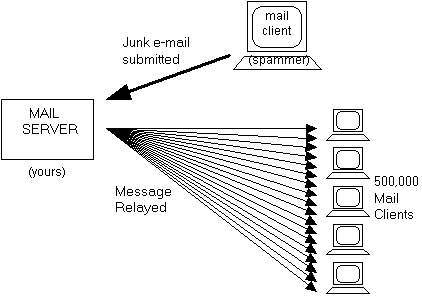
Figure 1-12 When a mail server is used to relay junk e-mail.
As you can imagine, sending out an e-mail message to half a million different users will take a fair amount of time. Also, since people tend to change their addresses now and then, this one outgoing message will generate a large number of undeliverable copies which will each be returned to – and handled by – the same mail server that is occupied with distributing the other 499,999 copies of this message. Not surprisingly, the performance of your mail server will become very, very slow while it is grinding through these tasks, and it may be temporarily unable to send or receive any other mail.
Notice another thing about the above illustration: from the perspective of the 500,000 recipients of the spam message, this message is coming from your mail server! Like any legitimate piece of e-mail, this spam message will include a header that indicates the name of the mail server that sent it. To the recipients of this e-mail, it appears that you are a spammer, since your mail server is obviously the instrument by which the junk e-mail was delivered. Because of this, sites that are trying to combat spam may send you unpleasant letters of protest, or decide to block any and all messages coming from your mail server.
In a nutshell, abusive relaying can result in your valuable mail server resources being hijacked by spammers and used to distribute junk e-mail – whether you like it or not.
Mail relaying is made possible by the openness of the SMTP protocol, which defines the way that computers exchange electronic messages. By definition, SMTP mail servers accept network connections from mail clients and mail servers from around the network (or the Internet), receive whatever e-mail messages that the connecting system gives it, and processes the delivery of the messages – regardless of the content of these messages, the number of recipients, or the likelihood that the recipients will want the message.
The following example shows the type of transaction that led to the mail server in Figure 1-12 attempting to deliver 500,000 copies of a junk mail message (a variation of the SMTP conversation shown in Figure 1-6):
|
Hello this is Computer1 (mail client)
>>> Hello this is the mail server on Computer2 I want to send you a message from Sir Spamalot >>> OK It’s for these 500,000 people: (list of names) >>> OK Here’s the message, ending with our secret handshake >>> OK Data, data, ... data, secret handshake >>> Message received Good-bye. >>> Good-bye, I’m off to deliver this message to everybody ... |
Again, accepting messages and sending them to their ultimate destinations is the primary function of a mail server, so they’re supposed to work this way. The folks who designed e-mail systems and the SMTP protocol never imagined that the technology would eventually be used to send "Make Money Fast!" messages throughout the world, so there is nothing inherent in the protocol for deciding what message should and shouldn’t be accepted. Until a clear standard for combating abusive relay emerges, solutions to the problem will vary from mail server to mail server.
A particularly destructive abuse of the e-mail systems of the world is something known as a denial of service attack. Unlike spamming and abusive relaying, which create problems for mail servers as a side-effect of distributing junk e-mail, a denial of service attack is created solely for the purpose of disrupting or stopping mail activity. These wanton acts of destruction are both unethical and illegal.
There are different kinds of denial of service attacks. The most common type that targets e-mail servers involves a program that opens many network connections to a server and maintains these connections despite having no interest in the services provided by the server. For example, a program can open multiple network connections to port 25 of a mail server (which is the port that servers "listen to" for receiving incoming messages), and maintain those connections for the sole purpose of occupying the mail server. Such an SMTP transaction might look like this:
|
Hello this is Computer1 (denial of service attack program)
>>> Hello this is the mail server on Computer2 I have nothing for you to do right now. >>> OK Tell me again who you are. >>> I’m the mail server on Computer2 I have nothing for you to do right now. >>> OK Tell me again who you are. >>> I’m the mail server on Computer2 I have nothing for you to do right now. >>> OK ( ... and so on) |
It’s obvious from the flow of the above conversation that the connecting client has no intention of transmitting a message, and that it is simply wasting the server’s time. However, the server is designed to satisfy requests from various clients, not to decide the worthiness of each connection, so it will remain connected to this client until the client closes the connection or goes an extended period of time without issuing a command to the server.
Although the above example seems non-threatening, imagine if hundreds of clients were simultaneously executing the same pointless transactions on the same mail server. The result would be a server that is so busy giving useless information to clients who won’t go away that it cannot be reached by the e-mail clients and servers that actually want to give it mail. True to its name, this kind of attack denies services to other computers and users.
Post.Office ©Software.com, Inc. 1994-1998
