



E-mail with Post.Office
If your goal is to get Post.Office set up as fast as you can and you don’t really give a hoot about the finer details, you may want to skip ahead to Chapter 3. The information presented here is not absolutely required for the operation of Post.Office. Rather, it is provided for those who prefer to start with an overall view of the Post.Office system, as opposed to a more hands on, trial and error approach. Contents include:
As you read through the Post.Office features you will discover that Post.Office does a lot more than just trade messages with mail clients and other mail servers. Although Post.Office is first and foremost a mail server, features such as mailing list management, finger service, and automatic replies do a lot to enhance the functioning of your e-mail system.
Of course, the heart of any mail server is its support of e-mail accounts. Post.Office mail accounts are more flexible and easier to use than what you’re likely to with other mail servers. While e-mail is complicated, on the whole Post.Office is not.
All mail accounts in Post.Office include the features described in the following sections.
An unlimited number of e-mail addresses may be assigned to a single account. You can even include addresses with different domains in the same account. Post.Office easily accommodates systems with multiple addressing formats and/or the requirement to host multiple domains.
Every mail account in Post.Office can support the following types of mail delivery:
Every account must have at least one delivery option, but multiple options may be selected for a single account. For example, a corporate user may choose to have POP3 delivery to his mailbox on the company server and forward all mail to the e-mail address for a personal account accessed from a home computer.
Users can select their own delivery options (unless specifically prohibited by the Postmaster), so the Postmaster is not required to modify this information every time a user wants to change their delivery method.
The Post.Office Auto-Reply feature allows you to set up an automatic reply message to be delivered in response to all mail sent to a given account. There are three different auto-reply options available:
Post.Office allows e-mail accounts to be optionally listed in a Mail Account Directory. This directory allows users to browse through a list of e-mail accounts and get names, e-mail addresses, and home page information for other users with Post.Office accounts. This information can be made available only to users with accounts in Post.Office, or can be shared via a web interface with all users on your network (or the Internet).
By default, all users with e-mail accounts in Post.Office can execute the following account-related operations through the end user web interface:
However, the Postmaster has the option of restricting access to any or all of these options in the web interface. For example, you can "switch off" the Select Mail Delivery Method option if you don’t want users to have access to this functionality. This allows you to customize Post.Office behavior to match your organization’s needs. See Chapter 4 for more information.
In addition to the management of e-mail accounts, Post.Office includes a mailing list manager. A mailing list is a group of users who share information on a common topic. Mailing lists allow electronic messages to be distributed to all of the list’s subscribers by submitting a message to a single address.
The mailing list manager is completely integrated with the rest of Post.Office – no extra options must be added for your installation of Post.Office to support mailing lists. The Post.Office mailing list manager offers a number of nice features, some of which are described in the following sections.
In addition to a web browser interface, the Post.Office mailing list manager includes an e-mail interface which is similar to existing mailing list manager programs, including the popular Majordomo mailing list manager. Instead of making experienced mailing list users learn a bunch of new commands and operations, Post.Office has adopted many of the Majordomo conventions.
The mailing list manager offers a limited interface to users who do not have e-mail accounts in Post.Office (that is, the rest of the teeming masses on the Internet). If you decide to allow it, users from outside of your system can request subscription to your mailing lists, and send and receive messages from those mailing lists. To ensure system security, external users are allowed these options exclusively and are prevented from further access to your mail server.
Each mailing list has a series of policies that define how subscription requests, unsubscription requests, and messages submitted for posting should be processed. The policies for subscription requests are further divided by users who have Post.Office e-mail accounts and everyone else (those teeming masses again), so you can create a mailing list that is open to all of your users, but closed to everyone outside of your system. With posting policies, a distinction is made between the users who are or aren’t subscribed to the mailing list, so you can choose to reject (or closely scrutinize) messages from non-subscribers while letting all subscriber mail go through.
To control mailing list activity, as Postmaster you can control the number of subscribers allowed for each list and the amount of mail traffic you will permit per day. Reasonable default limits are established upon installation of the software, but you can customize those values to suit your particular situation.
Moderation is the practice of closely scrutinizing user requests relating to a mailing list. Moderated requests are held for the attention of the list owner, who will periodically sort through them and approve or reject the requests as he or she sees fit. Mailing list moderation is an option, not a requirement. For each mailing list in Post.Office, any or all of the following items may be moderated:
For more detailed information on security options, see the discussions on general server security and mailing list policies in Chapter 4 and Chapter 7, respectively.
Post.Office supports specific "open standards" protocols and is designed to accommodate mail transfer between non-compatible protocols. Post.Office incorporates the Simple Mail Transfer Protocol (SMTP), which allows message transfer around the world via the Internet.
You can also use Post.Office to route non-SMTP messages to a gateway (i.e., to route UUCP messages to a UUCP gateway). See the discussion of mail routing options in Chapter 4.
All interactions with Post.Office are carried out via World Wide Web (WWW) forms: you request a form, fill it out, and submit the form to save your changes in the Post.Office database. There is no complicated syntax. You don’t need to learn any programming languages to install or operate the system. You don’t even need to do your configuration and management from the host where Post.Office is installed.
All forms include instructions on how to fill them out, so you should be able to complete them without even referring to this manual.
Post.Office allows ordinary users to make certain changes to their e-mail accounts using special forms of limited scope. While unable to make changes which would jeopardize the mail system, end users do not have to disturb the Postmaster to make changes which affect only their account, such as modifying their preferred method of mail delivery or resetting their account password.
Since Post.Office is designed to be a wide-area network messaging system, you aren’t tied to a single local network. When your organization expands, so does Post.Office.
In fact, Post.Office is Internet-ready, so your messages can travel easily around the planet. If you are already on the Internet, Post.Office will handle mail for any number of Internet domains on the same machine.
The finger server allows people to find limited information about one another if they know each other’s e-mail address. With Post.Office, modifiable finger information exists for each mail account, which provides directory information (in addition to the Mail Account Directory) for every user who has an e-mail account with Post.Office. Users can modify their finger information without assistance from the system administrator.
Although sendmail is available exclusively on UNIX platforms, this functionality is duplicated on NT with the postmail utility, also described in Chapter 11.
Just about anyone who does anything with e-mail can use Post.Office to do it. The Postmaster can use Post.Office to easily administer his/her organization’s e-mail system; users with e-mail accounts can use Post.Office to specify how their mail should be handled, join mailing lists, and manage mailing lists; even computer users who don’t have Post.Office e-mail accounts can use it to join mailing lists that have been made available to the public.
Each of these types of users is described in the following sections.
There is always somebody who supervises the electronic mail system. This person is known as the Postmaster.
As e-mail systems have evolved from a few users to the millions who currently send messages across a variety of public and private networks, a need has evolved for institutions such as corporations and universities to appoint individuals to supervise day-to-day e-mail operations. These Postmasters are entrusted with maintaining the software (mail clients and mail servers) required to support e-mail, as well as providing certain information and services to users.
In addition to installing mail servers and providing users with mail clients, a Postmaster must in general keep an eye on the e-mail system to ensure that messages are being properly delivered in a timely manner. Postmasters receive error messages from the mail server when things go wrong. For example, the Postmaster is usually the first to know that a disk is full, or when a portion of the network is down, since messages start to queue up abnormally. They can be notified of incorrectly addressed messages that the system failed to deliver. The Postmaster can then try to correct the problem so that the message can be delivered, or have the message returned to its sender.
The Postmaster also functions as an e-mail guru for users, both by opening and closing e-mail accounts and by helping users with questions. Other e-mail related tasks that they may supervise include maintaining mailing lists and establishing aliases (additional names under which users can receive mail). Many Postmasters are also responsible for general system maintenance, system security, and user training.
The Postmaster’s duties include the following:
Although it is not required, the Postmaster also typically serves as the e-mail "guru" for users, answering questions about their accounts and assisting them with whatever problems they encounter.
We’ve made a real effort to make things simple for the Postmaster. Your users are able to change certain aspects of their own accounts, as described in the next section, so users will generally leave you alone. This should minimize the administrative aspects of your job as Postmaster.
Users can choose how their messages are delivered and change their password on their own. When leaving town for a few days, they can set up an auto-reply message to let people know that they’re on vacation.
There are no arcane and apparently nonsensical configuration files to puzzle through, such as the sendmail.cf file. All changes can be made in simple web or e-mail forms, all of which come with instructions on their usage. We tried to do everything in English – if you catch us being overly technical or using esoteric jargon and abbreviations, e-mail us, and we’ll fix it.
After the Postmaster, the next class of users are those who have e-mail accounts on the Post.Office server. These users are referred to as local users, and they can perform a wide range of operations related to their mail accounts. These users can also advance to the status of list owners, a class of local users with nearly Postmaster-like privileges over one or more mailing lists.
By default, all users with e-mail accounts in Post.Office can perform the following account-related operations:
In addition to the above account options, all local users can also perform the following mailing list-related operations:
List owners are a special class of local users to whom the Postmaster has delegated authority over one or more mailing lists. Any local user is eligible to own any number of mailing lists, over which he/she has wide-ranging administrative authority, including the ability to:
The many facets of list ownership are discussed in detail in Chapter 7.
Despite the seemingly wide range of operations available to them, local users are restricted from doing any of the "important" things that have a large impact on Post.Office – these activities are the jurisdiction of the Postmaster alone. For example, local users cannot create or modify addresses for their accounts. They cannot modify the attributes of an account other than their own, cannot create accounts or mailing lists, and cannot set or modify ownership over a mailing list.
To facilitate the sharing of directory information, as well as the creation of public mailing lists, Post.Office can make certain information available to all users, whether or not they have accounts in your installation of Post.Office. This means that if you choose to share this information, users outside of your system – possibly anyone in the world with an Internet connection – can view information on your system’s mail accounts, and subscribe to your mailing lists. While this may sound alarming, be assured that these outsiders are confined to a relatively modest and limited area of the interface, and can never modify any part of Post.Office. So relax.
A special part of the Post.Office interface is provided for these "public" users, who are also known as remote users. A public Mail Account Directory allows remote users to view the names and e-mail addresses of mail accounts on your system (if the accounts have been specifically listed there). Meanwhile, a special mailing list manager interface allows remote users to carry out the following mailing list operations:
Refer to Chapters 5 and 7 for more information on remote users and the interface they use to interact with Post.Office.
Mail server functions are distributed among a number of software modules which work together to carry out message handling and other activities. This section gives you a bird’s eye view of the Post.Office architecture. If this is the kind of thing you really dig, you can wallow in the nitty-gritty details in Appendix A, which is devoted exclusively to a discussion of the Post.Office system software architecture. If you just want to know how the stuff works and don’t much care why, you may want to skip ahead to the chapters that discuss Post.Office operations.
Figure 2-1 shows Post.Office broken down into five functional chunks: the Post.Office managers, the MTA, a finger server, a password server, a POP server, the MTA, and the database which contains all of the information required to run the mail server. These items are all discussed in the sections that follow, along with the omnipotent Dispatcher which tells them when to run.
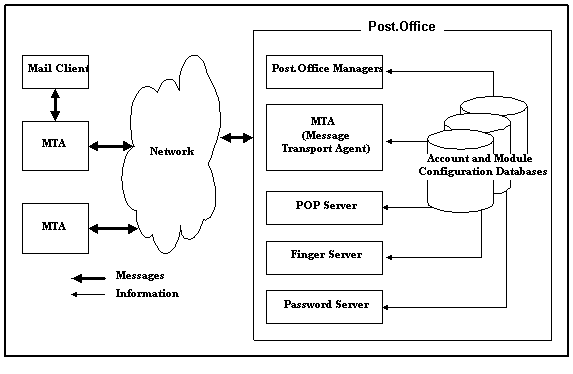
Figure 2-1 The primary components of the Post.Office mail server (which run under control of the Dispatcher). Arrows indicate the flow of messages between Post.Office and external mail servers and the flow of information from the account and configuration databases to the various Post.Office modules.
All mail server modules are coordinated by the Post.Office Dispatcher which runs as a daemon. The Dispatcher monitors all network ports related to e-mail and starts up the appropriate modules to handle incoming connections. The Dispatcher also controls the number of processes which can be run simultaneously, thereby limiting the computer resources required to process e-mail.
The Dispatcher determines to whom an item should be sent based on the port on which the item was received.
The role of the MTA (which stands for Mail Transport Agent) is to exchange messages with other mail servers, accept messages directly from mail clients, and deliver messages to the appropriate location (as specified by the Post.Office delivery instructions for a particular account). To run the Post.Office system successfully, no further knowledge of this module is required. However, if you feel the need to delve further into this topic, feel free to review the detailed discussion in Appendix A.
The account and configuration databases play a crucial role in the Post.Office picture. They store the data that the rest of the modules rely on to carry out their tasks.
The account database holds all user account information, so it can be quite large. All modules refer to the account database whenever they need account information in order to process a message or otherwise carry out a task. By keeping all user information in one place, a single configuration change updates all modules at once.
Every Post.Office module has a database which contains the configuration information for that module. For most modules, this database is fairly small, containing only a few configuration options and a list of error messages.
Post.Office managers are the interface between the Postmaster and the mail system. These modules process the forms that you submit, following your instructions to update and maintain the account and configuration databases.
There are four Post.Office managers: the Account Manager, the Configuration Manager, the List Manager, and the WWW-Server.
The Account Manager handles e-mail forms requesting information from or changes to the accounts database only. The Configuration Manager handles e-mail forms requesting information from or changes to any of the various configuration databases. The List Manager handles e-mail messages sent to any mailing list request address, and provides information about or makes changes to mailing list information only. The WWW-Server responds to all requests received via web forms. It can retrieve and modify both account information and mailing list information, in addition to general system configuration options.
The POP server answers client requests to download mail. These requests are made by POP3-compatible mail clients, which retrieve and store the messages that Post.Office has received for their respective users.
The finger server answers finger queries, a widely used feature which allows users to find out information about someone whose e-mail address they know. For example, if you query "Jane.Doe@Software.com," you’ll get her phone number and address (as illustrated in Chapter 1).
The Password Server allows the Eudora mail client to communicate with Post.Office for the purpose of updating a user’s POP3 mail account password. Refer to the Post.Office FAQ for information on using this particular feature.
The brief descriptions given above should provide most people with a more comprehensive outline of the Post.Office design than they will ever need in order to operate the system. However, if you’re one of those people who needs or wants to know the polarity of the coil, the size of the plug gap and the required torque on the bell housing before driving the car, further details are available in Appendix A, which is devoted solely and exhaustively to Post.Office architecture.
Post.Office ©Software.com, Inc. 1994-1998
