



Program Delivery
This chapter describes the Program Delivery feature of Post.Office mail accounts, and is intended for advanced users.
Along with typical delivery options like POP3/IMAP delivery, and mail forwarding, Post.Office allows you to deliver messages to the program of your choice. This method of delivery – called Program Delivery – allows you to use a message archive, sorting system, faxing mechanism, or do just about anything other type of "plug-in" delivery mechanism that you can devise.
Just as individual users can select POP3 delivery for their accounts, they can also select Program Delivery. However, the Postmaster usually must move the program in question to a special Post.Office directory, set appropriate file permissions, provide a server login username and password, and other administrative tasks required to make this delivery method work. Setting up Program Delivery is therefore really a Postmaster-only activity.
You may be a little confused by this notion of delivering mail to a program instead of to something simple like a user mailbox. What the heck does that mean? Well, you’ve actually been delivering mail to a program all along – when your mail client sends off messages, it delivers them to a program called Post.Office. This program knows what it is supposed to do with such a message and processes it accordingly, which could mean resending it to another e-mail server, storing it in a user’s mailbox, or any of the other neat delivery things that Post.Office can do.
The programs used with Program Delivery work the same way. They read as their input the entire contents of a message (headers plus body), do whatever sort of processing they were designed to do with these messages, and then signal to the sender – in this case, Post.Office – that the message was accepted and processed correctly (or return an error to indicate that delivery did not go as planned). One example of this is a message archiving program: when mail arrives to the appropriate account, Post.Office starts up the archiving program, which then reads the message line-by-line from the system’s standard input (STDIN), writes it to whatever file it uses to store messages, and then quits with the appropriate return value to signify success or failure.
Of course, the "starts up the program" part of the above scenario is actually a bit complicated. Like any program, the programs used with Program Delivery must be executed on the server system by a particular user (that is, by a OS X user account) which has appropriate access to both the executable file and to the directory in which it resides. This is where the Program Delivery concepts of trusted programs and a trusted program directory enter the picture.
A trusted program is an program that you, the Postmaster, deem acceptable for using with the Program Delivery feature. Because programs can access potentially sensitive areas of your server system, not all of them should be "trusted" to handle e-mail messages. Even if executed by a user with malicious intent, trusted programs should still behave nicely. Trusted programs typically consist of mail filters, distribution list software, automatic responders, and the like – useful for processing e-mail, but useless to hackers trying to compromise server security.
You signify your trust in a program by copying
it to the trusted program directory (see below) and setting its file permissions
to allow it to be executed by one or more users. Remember, you’ll be supplying
the name of a user account that Post.Office should use to invoke the program,
so this user account should have execute access.
It is critical that the behavior of each trusted program is well understood and known to be safe. In particular, programs that interpret their input as a sequence of commands (such as UNIX shells like sh and csh, or scripting languages like perl and tclsh) should not be set up as trusted programs. However, some scripts that run under these command interpreters may be considered safe after careful inspection.
Post.Office looks for trusted programs in a special directory known as the trusted program directory. Only executable files (or a hard or soft link to an executable) found in this directory will be considered to be trusted programs. If a path to the executable file is included in the Program Delivery options for an account, this path will be ignored and Post.Office will look for the program only in the trusted directory; this allows the System Administrator to specify the exact executable files which will be run by the Program Delivery feature.
You can set any directory to be the trusted program directory (as described in Section 6.3.2).
Remember, the server login account which is used to invoke a program in the trusted directory must also have appropriate access to the trusted directory itself.
Just as Post.Office will sometimes encounter a problem when processing messages (such as an invalid destination address, etc.), the programs used with the Program Delivery feature may encounter problems which prevent them from completing their task. Such errors generate an error message that is sent to the Postmaster which alerts them to this development. In most cases, these errors are caused by the specified user having insufficient permissions to run the selected program.
When a Program Delivery error occurs, recheck the user permissions and the Program Delivery information for the specified account (username, program, etc.). Post.Office will later attempt subsequent deliveries of the message to the specified program, which allows you to find the source of the problem and correct it.
Configuring program delivery involves three steps. First, you must have an actual program that can be used with Program Delivery. Second, you must copy this program to the trusted directory and set the appropriate file permissions for it. Finally, you must specify the Program Delivery method of delivery for an account instead of (or in addition to) POP3 or other delivery methods. This final operation requires you to provide the command-line arguments which invoke the program, as well as the login name and password of the OSX account which will run the program.
The UNIX program delivery module in Post.Office can operate in one of two modes, depending on the level of security desired. The module determines which operating mode to use by checking for programs in the trusted program directory. If none are found, the system operates in open mode, which allows users to run any command on the system.
If there is at least one file in the trusted program directory, the system runs in secure mode, which restricts users to running one of the trusted programs. Since only the system administrator (i.e. root) of the machine is allowed to add or remove trusted programs, the secure mode is indeed very secure.
When the program delivery module is set up to run in secure mode, it can be as secure as you need it to be. Since the trusted programs are the only programs on the system that it will run, regardless of how accounts are set up, the security vulnerability of a system running Post.Office is limited to this small collection of programs.
Again, programs that interpret their input as a sequence of commands (such as shells like sh and csh, or scripting languages like perl and tclsh) should not be set up as trusted programs.
The following algorithm is used to deliver mail to a user with a valid shell when Post.Office is set up in secure mode:
Operating the program deliver module in open mode requires a lot of trust (perhaps too much) on the part of the system administrator.
The Postmaster(s) must be trusted not to set up accounts with improper system permissions, since they can assign an arbitrary UNIX login to any account. Such an account can then be used to run commands as the assigned user, provided the user has a valid shell.
More importantly, the networks to which you are connected must be trusted. This is certainly not the case if you are connected to the global Internet, where so many tormented souls regularly attempt to break into your system that the secure mode should be used. If one of these system crackers were to compromise a Post.Office system, they might be able to set up accounts to provide them with privileged information, or to damage mail files. Of course they will never gain root privileges since no external program is ever run as root.
When opting for the open mode of operation, the system administrator can (and should) take precautions that minimize the risks. First of all, choose the Postmaster carefully. If nobody is qualified and responsible, the best choice is to do it yourself or set up Post.Office to run in the secure mode. Secondly, set up special accounts such as bin, sys, adm, and so forth with shells that are not valid for delivering mail to programs. (note that leaving the shell field blank does not accomplish this since a default of /bin/sh is assumed.) In the open mode of operation, it is especially important not to override the checking of valid shells in /etc/shells.
The following algorithm is used by Post.Office when delivering mail via the program delivery facility to a user with a valid shell:
The following instructions explain the steps that must be performed by a system administrator to enable program deliveries. It is important that the system administrator understands all of the implications of installing any setuid-root program (that is, a program that acquires root permissions when it is run) on the system. Due to the security issues involved, the program delivery module is disabled by default and must be activated explicitly.
In the executable directory are several sub-directories, including /local/ and /trusted/, which are where the program delivery module and the trusted program directory, respectively, are located. If you do not have root privileges on the machine running Post.Office, you will have to find a system administrator to do these steps for you.
The program delivery module can be activated by performing two simple steps as root. The resulting mode of operation is the open mode, so further configuration is required to set up the secure mode (which is highly recommended for most situations) with a list of trusted programs (see below).
Whenever the program delivery module finds a file in the trusted program directory named NO-PROGRAM-DELIVERIES, it refuses to deliver mail to any program. If an account is configured to deliver mail to a program, Post.Office generates a verbose error message to the Postmaster.
You must remove this file for program deliveries to work, and can create a new one at any time to disable the feature.
cd /usr/local/post.office/trusted

rm NO-PROGRAM-DELIVERIES
In order to run programs as a controlling user, the program delivery module needs to be setuid-root. If the setuid-root permission bit is not set, messages destined for users’ programs are deferred until either the setuid bit is enabled, or the maximum queue time expires and the message is returned to the sender.
cd /usr/local/post.office/local

chmod u+s Program-Deliver
If you want to set up Post.Office to run in the secure mode, you must set up some trusted programs. To do this, simply copy each program to the trusted program directory, or create a link in the directory to the program. This short example shows one way to set up a program called mail-filter as a trusted program:
cd /usr/local/post.office/trusted

ln -s /usr/bin/mail-filter mail-filter
If you want to allow users with login shells other than sh, csh, or ksh to use the program delivery feature, you need to set up /etc/shells. Simply list all of the allowed shells, one per line, complete with their full pathnames. Note that if you are creating the /etc/shells file for the first time, you need to include entries for any of the six default shells that you wish to allow. Here’s an example of a possible /etc/shells file:
% cat /etc/shells

/bin/csh

/bin/ksh

/bin/tcsh

/usr/bin/csh

/usr/bin/ksh

/usr/bin/tcsh

%
It is possible (though generally not advisable) to override the valid shell check by putting an entry in /etc/shells that contains the character sequence MAIL/ANY/SHELL. This may be used to allow any user to use the program delivery feature of Post.Office, but to restrict user access to FTP (which also does a valid shell check). An example /etc/shells file for this purpose might look like this:
% cat /etc/shells

/bin/ksh

/usr/bin/ksh

/MAIL/ANY/SHELL/

%
When delivering mail to a program, the permissions acquired by Post.Office are those of the UNIX login specified in the account. To be safe, no program will be run as root even if it is specified as the UNIX login for the account. Instead, a specific user ID and group ID will be assumed when delivering mail for a root user. These IDs are specified in the UNIX Delivery Configuration Options Form, which is invoked from the Set Special Delivery Configuration for UNIX link of the System Configuration menu.
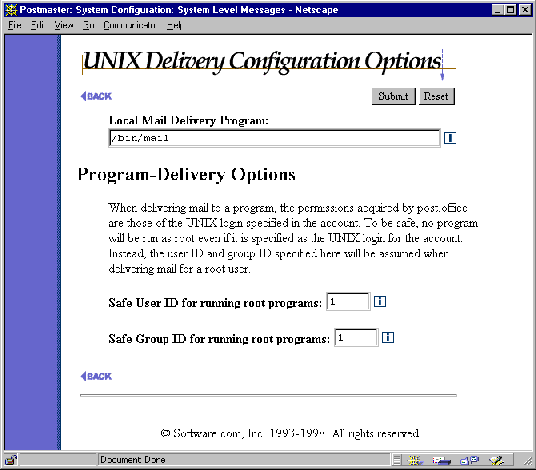
Figure 6-2:
UNIX Delivery Configuration Options Form
Enter a user ID and group ID in the Safe User ID and Safe Group ID fields, respectively, and submit the form. These values are used for checking user and group permissions when the program invoked by Program Delivery is executed.
You can disable the program delivery module simply by replacing the NO-PROGRAM-DELIVERIES file (which must be all capital letters with the dashes as shown). So long as this file remains in the trusted program delivery, Post.Office will not deliver any mail to programs. To do this, simply use the following commands:
cd /usr/local/post.office/trusted

touch NO-PROGRAM-DELIVERIES
Setting up Program Delivery for an account requires you to enable this option in the Account Data Form and specify the program to be run. The following illustration shows a snippet from the Account Data Form for UNIX platforms which includes the relevant fields:
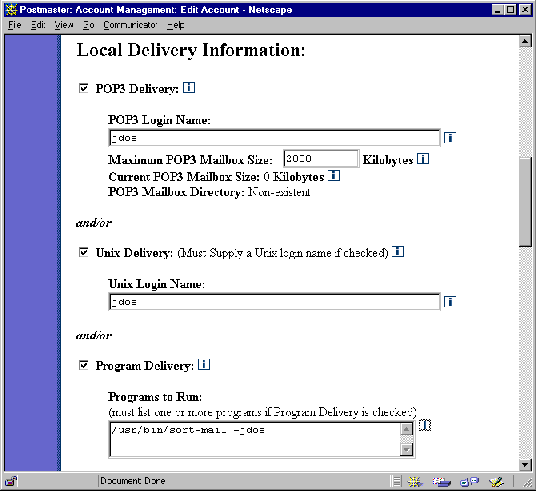
Figure 6-3: Account Data Form on UNIX platforms (delivery section)
Enable the check box labeled Program Delivery to set this option for the account. You must also provide a UNIX Login Name in the field above, and one or more Programs to Run in the field below. The program entry (or entries) must include any and all arguments required for execution.
When mail arrives to an account using this delivery method, the specified program will be run as the UNIX user specified in the UNIX Login Name field. If the user has sufficient permissions to do this, it’s then up to the program to read the message from standard input and process it correctly.
Post.Office ©Software.com, Inc. 1994-1998
